
What Is Browser Fingerprinting?
Browser fingerprinting is a tracking technique that identifies users by collecting information about their browser and device configuration. Unlike cookies, which are stored on your device and can be deleted, a fingerprint is computed from data your browser exposes by default -- information that exists because websites need it to function correctly.
Your browser reveals your operating system, screen resolution, timezone, language, installed fonts, GPU model, audio processing characteristics, and much more. Individually, none of these data points identify you. Combined, they create a signature that is unique to your specific browser on your specific device with overwhelming probability.
A 2020 study by researchers at INRIA found that over 94% of browsers with JavaScript enabled had unique fingerprints. The situation has only gotten more precise since then, as detection companies have added new signals and improved their hashing algorithms.
The Fingerprint Signals
There are over 50 individual signals that contribute to a browser fingerprint. Here are the most important ones:
The browser draws invisible text and shapes on an HTML5 canvas element, then reads back the pixel data. Different GPUs, drivers, font renderers, and OS-level anti-aliasing settings produce subtly different output -- enough to generate a nearly unique hash.
Similar to canvas but uses 3D rendering. The browser renders a 3D scene, and the output varies based on GPU hardware, driver version, and OpenGL implementation. Also exposes the GPU vendor and renderer strings (e.g., "ANGLE (NVIDIA GeForce RTX 3080)").
The browser generates an audio signal using the Web Audio API and measures how it's processed. Different audio hardware and drivers produce different floating-point output, creating a unique audio hash without ever playing sound.
The browser measures the rendered width and height of text in various fonts. By checking which fonts are installed (and how they render), a fingerprinting script can identify your specific set of installed fonts -- which varies significantly between machines.
Screen resolution, available screen size (minus taskbar), color depth, device pixel ratio, window inner dimensions, and whether the window is maximized. The combination of these values narrows identification significantly.
User agent string, platform, language(s), number of CPU cores (hardwareConcurrency), device memory, maximum touch points, connection type, and whether "Do Not Track" is enabled. Each adds a few bits of entropy.
Beyond these primary signals, fingerprinting scripts also collect:
- Timezone and locale --
Intl.DateTimeFormat().resolvedOptions().timeZonereveals your exact timezone, and locale settings reveal formatting preferences. - Plugin and MIME type enumeration -- less useful in modern browsers but still checked.
- WebRTC local IP leak -- WebRTC can expose local network IP addresses even behind a VPN, which can be used as an additional identifier.
- Battery API -- on browsers that still support it, the exact battery level and charging status can add entropy.
- ClientRects fingerprint -- measuring the precise bounding boxes of rendered DOM elements, which vary based on font rendering and layout engines.
- Speech synthesis voices -- the list of available text-to-speech voices differs by OS and language packs installed.
- Math precision -- the results of
Math.tan(),Math.atan2(), and other trigonometric functions vary slightly between CPU architectures and JS engines.
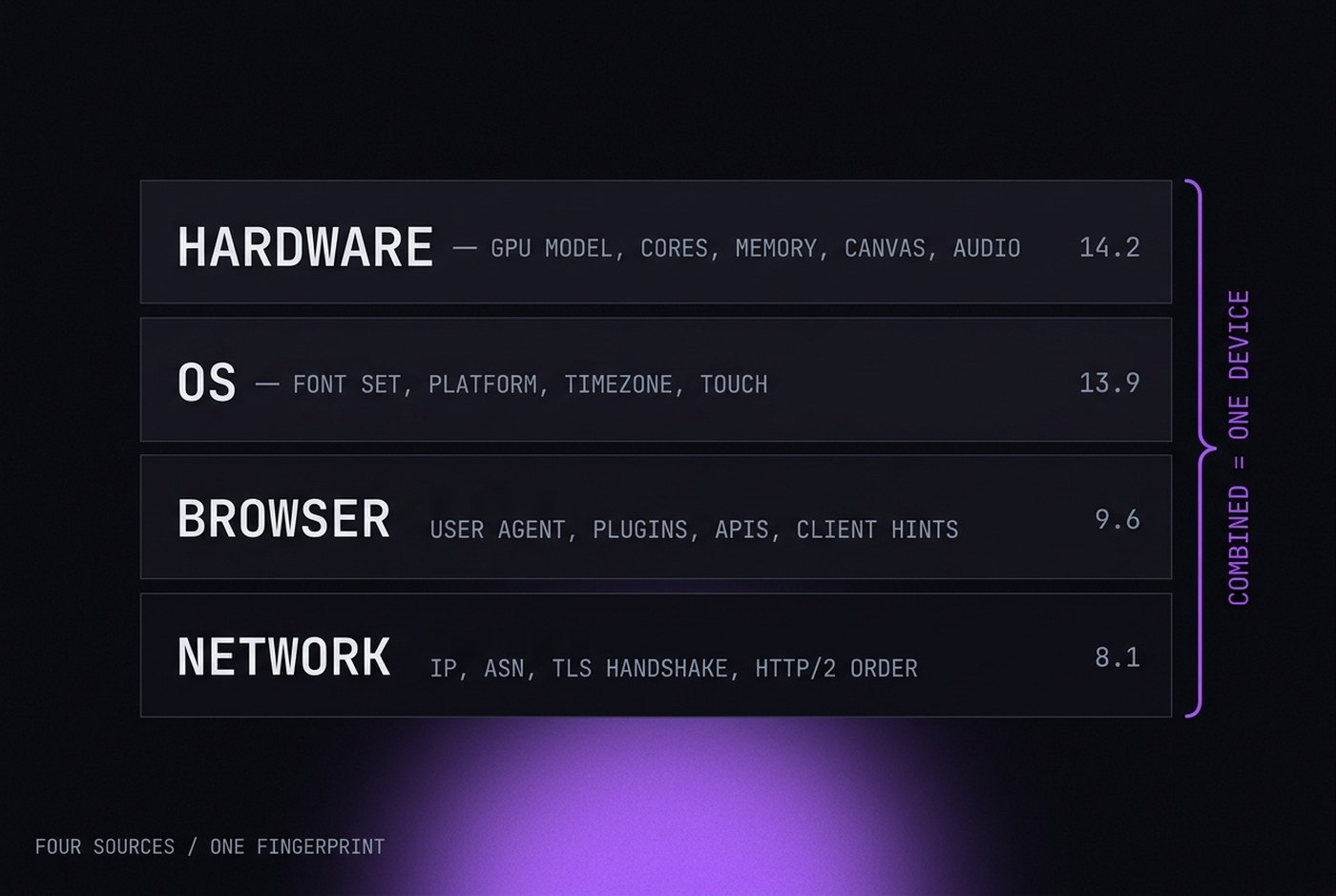
How Fingerprints Are Calculated
A fingerprinting script collects all of these values, serializes them into a string or structured object, and runs them through a hash function (typically MurmurHash3 or SHA-256) to produce a compact identifier. Here's a simplified example:
const signals = {
  canvas: getCanvasHash(),
  webgl: getWebGLHash(),
  audio: getAudioHash(),
  fonts: getInstalledFonts(),
  screen: `${screen.width}x${screen.height}x${screen.colorDepth}`,
  timezone: Intl.DateTimeFormat().resolvedOptions().timeZone,
  language: navigator.language,
  cores: navigator.hardwareConcurrency,
  memory: navigator.deviceMemory,
  platform: navigator.platform,
  userAgent: navigator.userAgent,
  touchPoints: navigator.maxTouchPoints,
  // ... 30+ more signals
};

const fingerprint = murmurhash3(JSON.stringify(signals));
The resulting hash is a short string -- something like a3f8c91b -- that serves as your browser's unique ID. This hash is stored server-side and compared against future visits.
Entropy: Why Some Signals Matter More Than Others
Not all signals contribute equally to uniqueness. The concept of entropy measures how much identifying information a signal carries. Higher entropy means more bits of information, which means the signal does more to narrow down your identity.
| Signal | Approximate Entropy | Uniqueness Impact |
|---|---|---|
| Canvas hash | ~14 bits | Very high -- GPU and rendering differences |
| WebGL renderer + hash | ~12 bits | Very high -- identifies GPU model |
| Installed fonts | ~11 bits | Very high -- varies per machine |
| AudioContext hash | ~10 bits | High -- hardware-dependent |
| Screen resolution | ~5 bits | Medium -- many share common resolutions |
| Timezone | ~4 bits | Medium -- ~24 major timezone groups |
| User agent | ~6 bits | Medium -- browser version adds specificity |
| Language | ~3 bits | Low -- limited set of common languages |
| Platform | ~2 bits | Low -- Win/Mac/Linux/Mobile |
| Color depth | ~1 bit | Very low -- almost everyone is 24-bit |
The total entropy across all signals in a modern fingerprinting script typically exceeds 40 bits. With 40 bits of entropy, there are over 1 trillion possible combinations -- more than enough to uniquely identify every browser on Earth.
Active vs. Passive Fingerprinting
Fingerprinting techniques fall into two categories:
Passive fingerprinting uses data the browser sends automatically with every HTTP request: the user agent header, accepted languages, accepted encodings, and connection characteristics. The server doesn't need to run any JavaScript. This is stealthier but provides fewer signals.
Active fingerprinting runs JavaScript on the page to probe the browser: rendering canvas images, querying WebGL, measuring audio output, enumerating fonts, and checking for specific API behaviors. This is far more powerful and is what most detection systems rely on.
In practice, detection systems use both. The passive fingerprint from HTTP headers is computed on the server side, while the active fingerprint is computed client-side via JavaScript and sent back as a signal. The two are combined and cross-checked for consistency.
How Detection Systems Use Fingerprints
Browser fingerprints aren't used in isolation. Modern detection platforms combine them with other signals to build a risk score:
- IP reputation -- Is the IP address associated with a datacenter, VPN, or residential connection? Has it been seen in abuse reports?
- Behavioral biometrics -- Mouse movement patterns, scroll speed, typing cadence, click timing. These are remarkably consistent per person and extremely hard to fake.
- Session consistency -- Does the fingerprint stay stable across page loads? Legitimate browsers have stable fingerprints. Fingerprints that change between page loads are flagged as spoofed.
- Cross-signal consistency -- Do all the fingerprint signals tell a coherent story? If the user agent says "Chrome on Windows" but the WebGL renderer is a macOS-only GPU, the fingerprint is inconsistent.
- Automation markers -- Is
navigator.webdriverset? Are there telltale properties left by Selenium, Puppeteer, or Playwright? Are Chrome DevTools detectable?
The fingerprint itself is just one input. What really matters is the consistency and plausibility of the entire signal package. A perfect fingerprint with a datacenter IP and robotic mouse movements will still get flagged.
Why Standard Privacy Tools Don't Work
Users often turn to privacy tools that are ineffective against fingerprinting:
Incognito / Private Browsing
Incognito mode clears cookies and history when the window closes. It does nothing to the fingerprint. Your canvas hash, WebGL output, fonts, screen resolution, and every other signal remains identical to your normal browsing session. The same fingerprint, just without cookies.
VPN / Tor
VPNs change your IP address. Tor also standardizes some browser properties through the Tor Browser. However, regular VPNs don't modify the browser fingerprint at all -- your canvas hash and WebGL renderer stay the same. And Tor Browser, while it does resist fingerprinting, is recognizable as Tor Browser itself, which many platforms block outright.
Browser Extensions
Extensions like Canvas Blocker or Fingerprint Spoofing add-ons try to intercept fingerprinting APIs. The problem is threefold: (1) extensions can be detected via their side effects on the DOM and API behavior, (2) they can't consistently spoof signals that originate below the JavaScript layer, and (3) the presence of specific privacy extensions is itself a fingerprint signal -- very few real users have them installed.
Multiple Browser Profiles (Chrome/Firefox)
Chrome and Firefox support multiple user profiles, and each has separate cookies and history. But they all share the same fingerprint because they're the same browser on the same hardware. Different profiles, same canvas hash, same WebGL, same fonts. Detection systems link them immediately.
How Anti-Detect Browsers Handle Fingerprinting
Anti-detect browsers are specifically designed to address fingerprinting at its source. Here's what a well-built one does differently:
Per-profile fingerprint configuration. Each browser profile gets its own complete fingerprint configuration: a specific canvas noise seed, a spoofed WebGL renderer matching a real GPU, a set of fonts consistent with the chosen OS, screen metrics that match a real device, and so on. The key is that all these values are consistent with each other.
Engine-level modification. In a properly built anti-detect browser, the fingerprint modifications happen inside the browser engine -- at the C++ level in Chromium. When a website calls canvas.toDataURL(), the engine itself returns modified pixel data. There's no JavaScript override to detect because the modification happens before the data reaches the JavaScript layer.
Noise injection with stable seeds. Rather than returning random values (which would change on every page load and get flagged), good anti-detect browsers use deterministic noise based on a per-profile seed. The same canvas test always produces the same hash within a profile, but different profiles produce different hashes. This mimics how real browsers behave -- your fingerprint is stable across sessions.
Hardware plausibility validation. Before generating a profile, the system validates that the combination of signals is plausible. A profile claiming to be Windows 10 with an Apple M2 GPU would be immediately suspicious. The fingerprint generator ensures that OS, GPU, fonts, user agent, and other signals form a coherent identity.
The goal isn't to make a browser that looks "anonymous." It's to make a browser that looks like an ordinary person using an ordinary computer -- just a different ordinary person for each profile.
The Arms Race
Browser fingerprinting is an arms race between detection companies and anti-detect tools, and it's accelerating.
Detection systems are getting more sophisticated. They're adding new signals (like getClientRects() measurements and WebCodecs API behavior), cross-referencing behavioral biometrics with fingerprint data, and using machine learning to identify "impossible" or "improbable" fingerprint configurations that no real browser would produce.
At the same time, anti-detect browsers are responding by modifying deeper layers of the browser engine, improving fingerprint consistency checks, and building more comprehensive databases of real-world device configurations to use as templates.
Two things are clear: fingerprinting isn't going away (it's too valuable for fraud prevention and ad targeting), and passive tools like VPNs and extensions aren't enough to address it. If fingerprint-level isolation matters to your workflow, you need a tool that was built specifically for the job.