
CDP was never meant to be quiet
Puppeteer, Playwright, Selenium 4 and every "stealth" wrapper built on them share one foundation: the Chrome DevTools Protocol. It is the same channel your browser opens when you press F12. Chrome exposes it so that a debugger can inspect and drive the page, and it was designed with exactly one non-goal — hiding the fact that a debugger is attached.
That is the root of the problem. The signals below are not bugs in Puppeteer. Most of them are CDP behaving correctly, in ways a human-driven browser never does. A detection vendor does not need to break anything to find them; it just needs to read values the platform hands out for free.
What follows is the list as it stands in 2026, ordered roughly by how cheap each one is to check.
navigator.webdriver, and why patching it in JS is worse
The oldest signal. navigator.webdriver returns true whenever Chrome is started with automation enabled. Every tutorial tells you to override it:
Object.defineProperty(navigator, 'webdriver', { get: () => false })This is not a fix. It is a second, louder signal. In a stock browser webdriver is an accessor on Navigator.prototype, not an own property of the instance. After the snippet above, three things are true that are not true anywhere else:
Object.getOwnPropertyDescriptor(navigator, 'webdriver')returns a descriptor. On a real browser it returnsundefined, because the property lives on the prototype.- The getter's
toString()reads() => falseinstead offunction get webdriver() { [native code] }. - The property now shadows the prototype, so
'webdriver' in navigatorand the prototype descriptor disagree.
Detection scripts have walked the toString chain for years. A browser that returns the honest true is a browser running automation. A browser that returns a forged false is a browser running automation and trying to hide it, which for most risk engines is the worse of the two.
The only version of this that survives inspection is one where the C++ getter itself returns false, so there is no own property, no arrow function, and nothing on the prototype chain out of place.
Runtime.enable: the leak that rewrote everyone’s stack
To evaluate JavaScript in a page, most libraries call Runtime.enable. That single command has side effects that reach into the page: it starts emitting Runtime.executionContextCreated notifications, and it changes how console arguments are serialised.
The classic exploit is short enough to fit in a tweet. Create an object with a getter, pass it to console.debug, and see whether the getter fires. With a debugger attached and Runtime.enable called, the protocol serialises the object for the client and the getter runs. Without one, nothing touches it.
let leaked = false;
const probe = { get id() { leaked = true; return 1; } };
console.debug(probe);
// leaked === true  →  something is listening on CDP
This is what pushed the ecosystem toward patched forks — rebrowser-puppeteer and friends — that avoid Runtime.enable and use isolated worlds or addBinding instead. Those patches work, and they are worth using. They also close exactly one hole out of ten.
Three bugs in synthetic input
When automation moves a mouse, it does not move a mouse. It calls Input.dispatchMouseEvent, and Chrome constructs an event object that is very nearly, but not quite, what the real input pipeline produces. Three differences are trivially observable from a page.
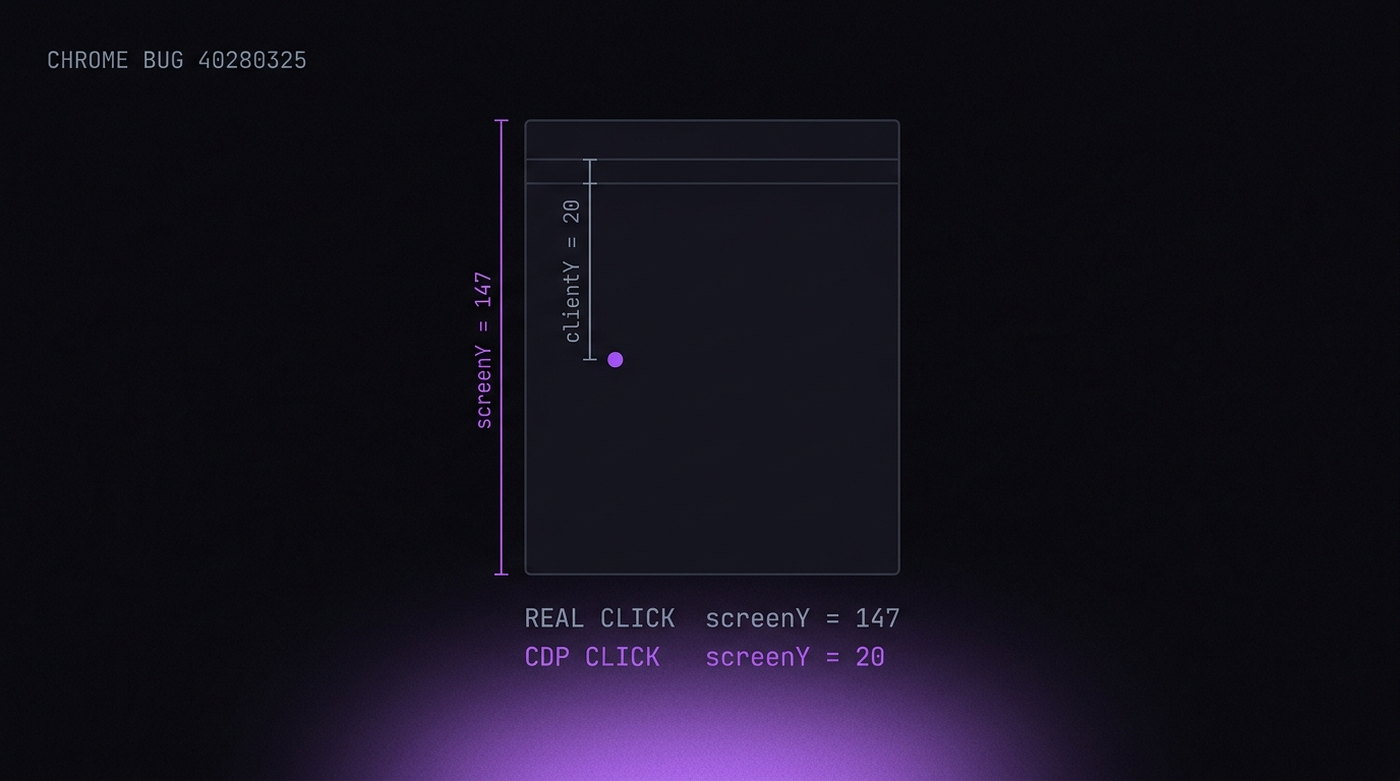
screenX and screenY are wrong
This is Chromium bug 40280325. CDP sets screenX = clientX and screenY = clientY — viewport coordinates where screen coordinates belong. For a real click the two differ by the window position plus the browser chrome: tab strip, address bar, bookmarks. On a maximised window that is roughly 90 to 130 pixels of vertical offset.
So a genuine click near the top of a page has screenY around 150. A CDP click at the same place reports screenY = 20. Cloudflare Turnstile treats a low screenY as a bot click, and it is right to: no human can click above their own browser chrome.
UIEvent.detail is zero
For a real click, event.detail carries the click count — 1 for a single click, 2 for a double. CDP-dispatched click events arrive with click_count = 0, so detail is 0. There is no user gesture that produces a click with a detail of zero. Turnstile checks this inside its challenge iframe.
getCoalescedEvents() is empty
Modern browsers batch high-frequency pointer movement and expose the raw samples through PointerEvent.getCoalescedEvents(). A real pointermove always carries at least one coalesced event — itself. A CDP-dispatched pointermove carries an empty array, because there was never a hardware sample to coalesce.
None of these can be repaired from JavaScript. The event object is constructed in C++ before any page script can see it, and the properties are read-only.
The strings automation leaves lying around
Two families of literal strings end up where a page can read them.
ChromeDriver markers. ChromeDriver tracks its own call results by defining document properties prefixed cdc_, $cdc_ or $chrome_. They are not hidden. A three-line loop over Object.getOwnPropertyNames(document) finds them, and detection scripts have looked for exactly this since 2018.
Puppeteer source URLs. Puppeteer appends //# sourceURL=pptr:... to the scripts it evaluates, and creates an isolated world named __puppeteer_utility_world__. Both surface in Error.stack if an exception crosses the boundary:
try { null.f() } catch (e) { /* e.stack may contain "pptr:" */ }These are the easiest signals to remove and the ones most commonly left in place, because they only appear under conditions a developer rarely tests — an uncaught error inside an evaluated function.
Workers: the context nobody covers
This is the gap that catches the most otherwise-careful setups.
Web Workers, Service Workers and Shared Workers each get their own global scope with their own navigator. That object is created by the engine, in the worker thread, from the browser's real values. CDP page-level overrides — Emulation.setUserAgentOverride, injected scripts, Page.addScriptToEvaluateOnNewDocument — do not reach it.
The result is a browser that claims one thing on the main thread and another inside a worker. A detection script only has to ask twice:
// main thread says 8; worker says 24
new Worker(URL.createObjectURL(new Blob([
  'postMessage([navigator.hardwareConcurrency, navigator.deviceMemory, navigator.platform])'
], { type: 'text/javascript' })));
Any disagreement between the two is conclusive. Real browsers cannot produce one, because both scopes read the same underlying values. The signals that leak this way include hardwareConcurrency, deviceMemory, platform, the full userAgentData brand list, and — through OffscreenCanvas — the WebGL vendor and renderer.
Fixing this from the outside is not possible in any complete way. The values have to come from the engine, which means the worker's navigator has to be built from the same profile as the window's.
The small stuff that still adds up
Three more, each cheap to check and each capable of ending a session on its own.
Outer dimensions with DevTools docked
The difference between outerWidth and innerWidth is the browser chrome — about 16 pixels horizontally and 85 to 90 vertically on desktop Chrome. Dock DevTools and that gap jumps by hundreds of pixels. A window reporting outerHeight - innerHeight = 400 is a window with a debugger open.
Storage quota
navigator.storage.estimate() returns a quota derived from free disk space. It is a strong hardware signal on its own, and it also gives away containers and incognito contexts, which report characteristic round numbers far below any real disk.
Missing APIs for the platform you claim
If your user agent says Windows Chrome 147, the page can check for the APIs Windows Chrome 147 actually ships. Headless builds historically lacked chrome.runtime, the full Notification permission flow, and codec support that headful builds have. Claiming a platform you cannot back up is worse than claiming nothing.
Why the fix has to be in the source
Look at the list and a pattern emerges. Almost every signal originates below JavaScript:
- Event properties are set in C++ before a script can touch them.
- Worker navigators are constructed on a thread the page cannot reach.
- The webdriver getter lives on a prototype whose shape is itself a signal.
- Runtime.enable side effects happen in the V8 inspector, not in the page.
A content script runs after all of it. It can only overwrite what has already been decided, and every overwrite leaves the tells described above: own properties where prototypes belong, arrow functions where native code belongs, disagreement between contexts.
This is the honest argument for a modified Chromium build, and it is worth stating its limits too. Patching the engine fixes the layer below JavaScript. It does not fix TLS and HTTP/2 fingerprints, which sit below the browser entirely, and it does nothing for behaviour — a session that clicks with inhuman regularity will be flagged regardless of how clean its properties are.
Testing your own setup
Do not take a vendor's word for this, including ours. The checks are public and you can run them in an afternoon:
- rebrowser bot detector — the reference suite for CDP leaks specifically, including the
Runtime.enableconsole probe and the utility-world checks. - CreepJS — the most aggressive public fingerprint auditor. It runs the worker-vs-window comparison described above and reports the mismatch explicitly.
- Your own page — the fastest test is twenty lines: log
screenYanddetailfrom a click handler, loggetCoalescedEvents().lengthfrom a pointermove, and post a worker's navigator back to the main thread. If any of the three disagrees with a browser you drive by hand, you have found your problem.
Run them against whatever you use today before you change anything. A tool that passes nine of these and fails the tenth is not nine tenths of the way there — a single conclusive mismatch is enough.