Measurement, not enumeration
There has never been a web API that returns a list of installed fonts. There has never needed to be one, because measuring is almost as good and requires no permission at all.
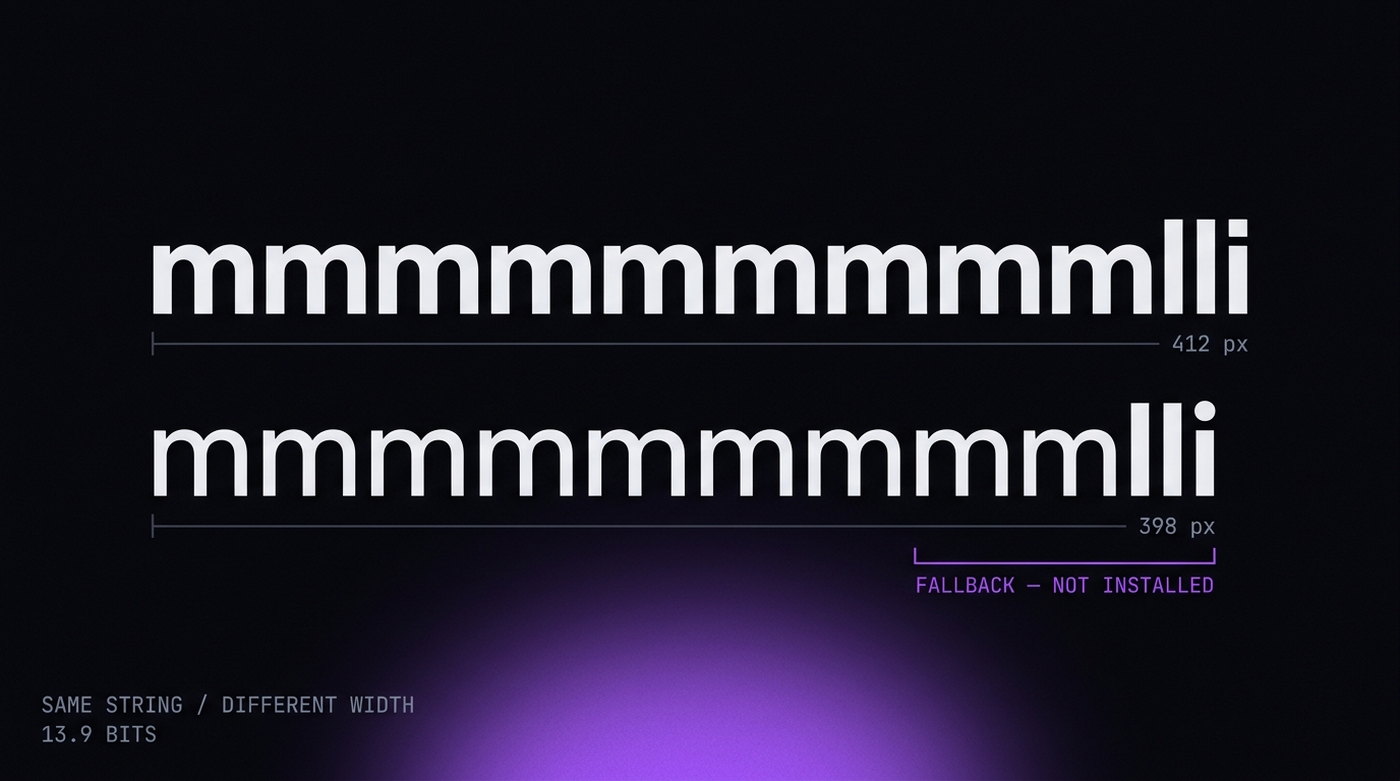
The technique is the same one used since roughly 2007. Render a string in a known fallback font and record its width. Then render the same string asking for the candidate font first, with the same fallback behind it. If the width changes, the candidate exists and was used. If it does not, the candidate is missing and the fallback drew it again.
const span = document.createElement('span');
span.style.cssText = 'position:absolute;left:-9999px;font-size:72px';
span.textContent = 'mmmmmmmmmmlli';

span.style.fontFamily = 'monospace';
document.body.appendChild(span);
const base = span.offsetWidth;

span.style.fontFamily = '"Segoe UI", monospace';
const installed = span.offsetWidth !== base;
The test string is not arbitrary. mmmmmmmmmmlli mixes the widest and narrowest glyphs in most Latin faces, maximising the width difference between any two fonts. At 72 pixels the difference is unmissable.
Run this across a list of two or three hundred candidates and you have the font profile. It costs a few tens of milliseconds and leaves no trace in any permission prompt.
Why fonts identify the operating system
Font sets are not random. They are shipped with the OS, and each platform ships a distinctive set.
| Font | Ships with | What its presence means |
|---|---|---|
Segoe UI | Windows Vista and later | Windows, near-conclusively |
Segoe UI Variable | Windows 11 | Distinguishes 11 from 10 |
Helvetica Neue | macOS | Apple platform |
Ubuntu, Liberation Sans | Common Linux distributions | Linux |
Calibri, Cambria | Microsoft Office | Office installed; weak Windows signal |
Arial, Times New Roman | Almost everywhere | Nothing |
This is the check that catches a spoofed user agent for free. A profile claiming Windows 11 that cannot render Segoe UI Variable has contradicted itself in one offsetWidth comparison — no external data, no reputation database, no machine learning.
The reverse mistake is just as common and harder to spot: a profile claiming macOS on a Windows host, where the host's Segoe UI is still installed and measurable. The user agent says Mac; the fonts say Windows; the fonts win.
How much it is worth
The EFF's Panopticlick work put font lists at roughly 13.9 bits of identifying information — enough on its own to narrow a browser to one in about fifteen thousand. That is among the highest single-signal figures in the fingerprinting literature, above screen resolution and well above the user agent string.
Two caveats keep it honest. First, that figure is from a self-selected population of privacy-interested users and overstates entropy for the general web. Second, it has been falling: Windows 11, recent macOS and mainstream Linux distributions ship increasingly similar default sets, and web fonts have removed most of the reason for anyone to install extras.
What survives the decline is the part that matters here. Even if the font list no longer uniquely identifies a machine, it still identifies the platform — and platform identification is what breaks an inconsistent profile.
The other ways to ask
Width measurement is the classic method, not the only one. An implementation that hooks only offsetWidth will miss these.
Canvas measureText
ctx.measureText() returns a TextMetrics object with sub-pixel advance width plus, in modern browsers, actual bounding box ascent and descent. It is more precise than element measurement and it lives in the canvas API, so it can be run inside an OffscreenCanvas in a worker where page-level hooks do not reach.
Pure CSS
Font detection can be done without JavaScript at all, using @font-face with unicode-range and a background image request that only fires when a particular fallback is used. No script to hook, no API to override.
Local Font Access
Chrome 103 shipped window.queryLocalFonts(), which returns the full local font list directly — behind a user permission prompt. In practice fingerprinting scripts do not use it, precisely because it prompts. It is worth knowing about mainly because a browser that claims Chrome 147 should have the API present, and a profile that removed it has created a new inconsistency.
Getting it right
Two approaches work, and one very common one does not.
What does not work: returning an empty or minimal list. A browser with five fonts is more remarkable than one with two hundred. It is the same error as randomising canvas — you have replaced a common value with a rare one and called it privacy.
Approach one: ship the right set. The profile claims Windows 11, so the font list is the Windows 11 default set, present and measurable. This is only fully achievable when the font stack itself is under control — the browser has to resolve font requests against a declared set rather than against whatever the host has installed. That is an engine-level concern, which is why it is one of the harder things to retrofit.
Approach two: do not claim a platform you are not on. Run Windows profiles on Windows and Mac profiles on Mac. Unglamorous, entirely effective, and free. If you have a choice of host, this is the cheapest correct answer available.
Whichever route you take, the constraint from the consistency article applies: the font set has to agree with the user agent, with the WebGL renderer and with the platform string. Fonts are simply the cheapest of the four to check, which is why they are checked first.
Checking your own
The quickest test is a single probe against the OS you claim. Paste this into the console of a profile and read the answer:
function has(f) {
  const s = document.createElement('span');
  s.style.cssText = 'position:absolute;left:-9999px;font-size:72px';
  s.textContent = 'mmmmmmmmmmlli';
  document.body.appendChild(s);
  s.style.fontFamily = 'monospace';       const base = s.offsetWidth;
  s.style.fontFamily = `"${f}", monospace`; const w = s.offsetWidth;
  s.remove();
  return w !== base;
}
console.log({
  windows: has('Segoe UI'),
  win11:   has('Segoe UI Variable'),
  macos:   has('Helvetica Neue'),
  linux:   has('Ubuntu')
});
Exactly one of those should be true, and it should be the one matching your user agent. Two true values means your profile is wearing two operating systems at once. For a fuller picture, browserleaks.com/fonts and CreepJS both enumerate the complete set and, in CreepJS's case, will tell you outright when the list disagrees with the platform you claim.