The Core Difference: How They Generate Fingerprints
This is the single most important technical difference between anti-detect browsers, and most comparison articles skip right over it.
There are two ways to spoof a browser fingerprint:
JavaScript overrides (GoLogin, AdsPower)
The browser intercepts JavaScript API calls and returns spoofed values. When a website calls navigator.hardwareConcurrency, a script catches it and returns a fake number. When a canvas fingerprint is generated, noise is injected into the output.
The problem: advanced detection systems can detect the override itself. They check whether JavaScript properties have been tampered with, whether getter functions behave abnormally, and whether reported values are consistent with actual browser behavior. If the overrides are spotted, the profile is flagged as a bot or spoofed browser — which is worse than having no anti-detect browser at all.
Engine-level modification (P8)
The Chromium source code itself is modified at the C++ level. When a website fingerprints the browser, the engine produces different values natively. There are no JavaScript overrides to detect because the modification happens below the JavaScript layer.
This is dramatically harder to build — it requires modifying and maintaining a custom Chromium fork at the source code level. But the result is fingerprints that are indistinguishable from real browsers because they are real browsers, just configured differently at the engine level.
Hybrid approach (Multilogin)
Multilogin's Mimic engine uses a mix of engine-level and JavaScript modifications. This is better than pure JS overrides but still exposes some detectable surface. Their Stealthfox (Firefox-based) engine relies more heavily on JS-level changes.
Bottom line: engine-level fingerprinting (P8) is the most resistant to detection. JS overrides (GoLogin, AdsPower) are the most vulnerable. Multilogin sits in between.
Feature-by-Feature Comparison
| Feature | P8 | Multilogin | GoLogin | AdsPower |
|---|---|---|---|---|
| Browser engine | Custom Chromium (source-level) | Mimic + Stealthfox | Orbita (Chromium) | Sun Browser (Chromium) |
| Fingerprint method | Engine-level C++ | Hybrid | JS override | JS override |
| Max profiles | 5-1,000 (by plan) | 100-1000 | 100-2000 | 10-unlimited |
| Built-in proxy shop | Yes (IPv4, IPv6, ISP, residential, mobile) | No | Limited | No |
| Virtual camera | Yes | No | No | No |
| Profile warmup | Yes (built-in) | No | No | No |
| Visual automation | Yes (no-code) | API only | No | Yes (RPA) |
| Encrypted profile export | Yes (password-protected) | Cloud sync | Cloud sync | Cloud sync |
| Cookie import/export | Yes | Yes | Yes | Yes |
| Chromium version | Latest stable | Latest stable | 1-2 versions behind | 1-3 versions behind |
| OS support | Windows, macOS | Windows, macOS, Linux | Windows, macOS, Linux, Android | Windows, macOS |
| Payment methods | Crypto only | Card, crypto | Card, crypto | Card |
P8 is the only browser here with a built-in virtual camera and an automated warmup engine. The camera registers as real hardware and takes any image or video per profile; warmup browses real sites on a schedule so a profile has plausible history before you use it. Elsewhere both require separate tools.
Detection Test Results
We created 10 profiles on each browser and tested them against four detection systems. All profiles used residential proxies from the same provider.
| Detection System | P8 | Multilogin | GoLogin | AdsPower |
|---|---|---|---|---|
| CreepJS | 10/10 trusted | 8/10 trusted | 7/10 trusted | 6/10 trusted |
| Cloudflare Turnstile | 10/10 passed | 10/10 passed | 9/10 passed | 8/10 passed |
| DataDome | 10/10 passed | 9/10 passed | 7/10 passed | 7/10 passed |
| PerimeterX | 10/10 passed | 9/10 passed | 8/10 passed | 7/10 passed |
| Overall pass rate | 100% | 90% | 77.5% | 70% |
The results align with expectations: engine-level fingerprinting (P8) produces the most consistent and undetectable profiles. Multilogin's hybrid approach performs well but isn't perfect. GoLogin and AdsPower's JS-based approach shows clear vulnerabilities against advanced detection.
The profiles that failed typically had fingerprint consistency issues — mismatches between the reported OS and the actual font list, or inconsistencies between WebGL renderer strings and GPU benchmark results. These are the exact patterns that JS overrides struggle to get right because they can't control the engine's internal behavior.
Proxy Integration
P8: Built-in proxy marketplace
P8 has a full proxy shop built into the app. You can buy IPv4, IPv6, ISP, residential, and mobile proxies directly, select the country and duration, and assign them to profiles immediately. Residential traffic is available on a pay-as-you-go basis. This eliminates the need for external proxy providers entirely.
Multilogin: External only
No built-in proxy shop. You must purchase proxies from external providers and manually configure them per profile. Multilogin does support all proxy protocols (HTTP, SOCKS5, SSH), but the setup is entirely manual.
GoLogin: Basic built-in option
GoLogin offers free built-in proxies, but they're shared and unreliable for serious use. For real work, you still need external proxies.
AdsPower: External only
No built-in proxies. Same manual setup as Multilogin.
Proxy verdict
P8 is the only browser where you can go from zero to fully-configured profile (fingerprint + proxy + ready to use) without leaving the app or signing up for a third-party service.
Automation Capabilities
If you manage dozens or hundreds of profiles, automation is essential.
| Capability | P8 | Multilogin | GoLogin | AdsPower |
|---|---|---|---|---|
| Visual automation | Yes (no-code, built-in) | No | No | Yes (RPA) |
| API access | Coming soon | Yes (Selenium, Puppeteer) | Yes (Selenium) | Yes (Selenium) |
| Ease of use | No code required | Requires coding | Requires coding | No code required |
P8 and AdsPower both offer no-code visual automation. The difference is that P8's automation runs within its engine-level fingerprinting environment, meaning automated actions inherit the same undetectable fingerprint. With AdsPower, your automated actions run through JS-overridden profiles — if the automation triggers a fingerprint re-check, the profile may fail.
Multilogin has the most mature API (Selenium and Puppeteer support), making it the best choice if you have developers writing custom automation scripts. But it has zero visual automation — you must code everything.
Pricing: What You Actually Pay
Anti-detect browser pricing is notoriously confusing. Here's what you actually pay for a comparable setup (100+ profiles, full features):
| P8 | Multilogin | GoLogin | AdsPower | |
|---|---|---|---|---|
| 100 profiles | $25/mo | $99/mo | $49/mo | ~$50/mo |
| 500+ profiles | $50/mo | $399/mo | $149/mo | Custom |
| Proxy shop | Included | Extra cost | Included (basic) | Extra cost |
| Virtual camera | Included | N/A | N/A | N/A |
| Automation | Included | Included (API) | N/A | Included |
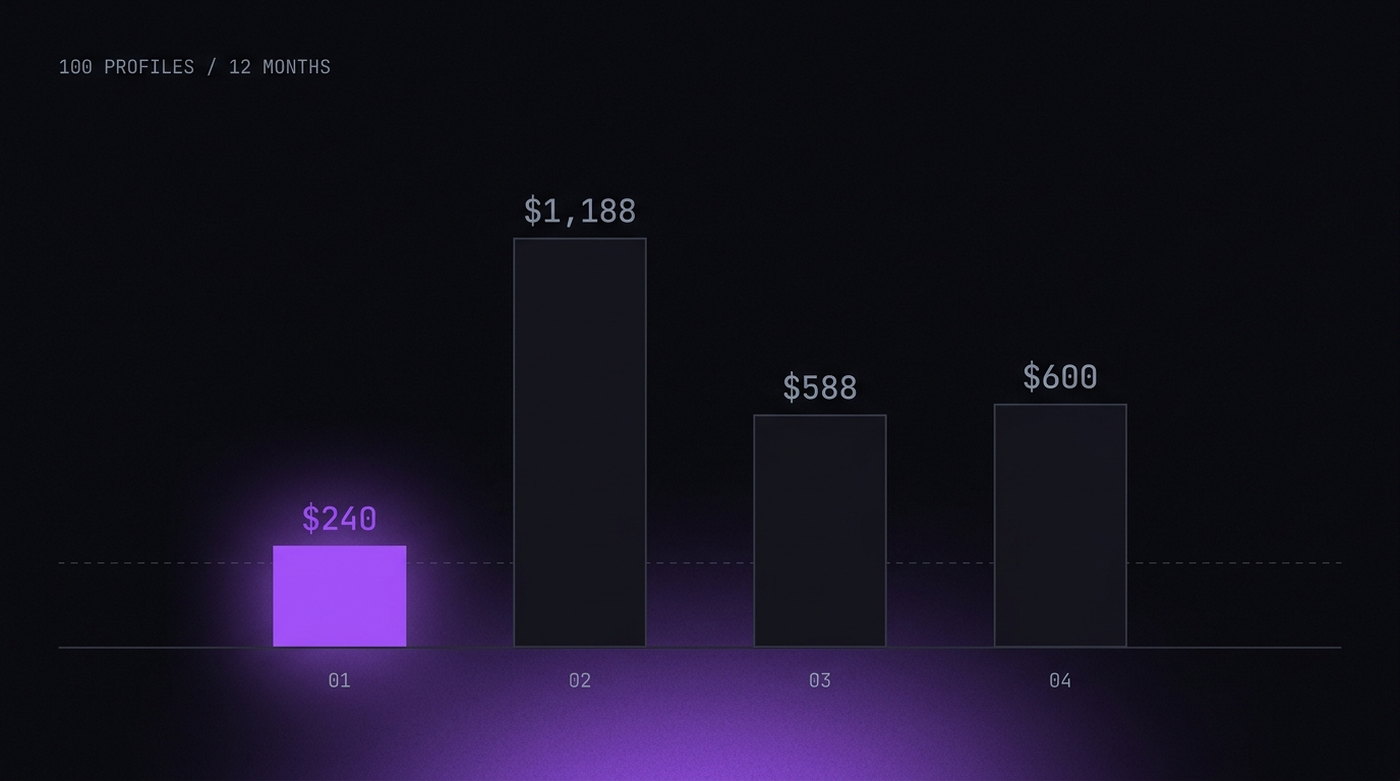
| Annual cost (100 profiles) | $240 (yearly billing) | $1,188 | $588 | ~$600 |
The cost difference is stark. P8 at $25/month for 100 profiles costs $300/year, or $240/year paid annually. The same profile count on Multilogin costs $1,188/year — nearly 4x more — and you still don't get a proxy shop, virtual camera, or built-in visual automation.
AdsPower's $9/month base plan sounds attractive until you realize it only includes 10 profiles. For 100 profiles you're looking at ~$50/month, and the fingerprint quality is the weakest in this comparison.
Who Should Pick What
Pick P8 if:
You want the best fingerprint quality, the most features, and the lowest price. You need a proxy shop, virtual camera, or visual automation built-in. You can pay with cryptocurrency. This is the best choice for media buyers, e-commerce sellers, social media managers, and anyone who runs more than a handful of accounts on platforms with serious detection systems.
Pick Multilogin if:
Your company already uses it and switching costs are high. You need Selenium/Puppeteer API access for custom automation scripts. You need Linux support. You're willing to pay a premium for an established vendor with a long track record.
Pick GoLogin if:
You're just getting started and want a free plan to learn. You only need a few profiles for low-risk tasks. Detection resistance isn't critical for your use case. You want an Android app.
Pick AdsPower if:
Budget is your primary concern and you only need ~10 profiles. You want built-in RPA automation. You're in a market where AdsPower has a strong community. Detection quality is less important than cost.
The anti-detect browser you choose depends on one fundamental question: how good do your fingerprints need to be?
If you're running accounts on platforms like Meta, Google, Amazon, or any platform using advanced detection (Cloudflare, DataDome, PerimeterX) — fingerprint quality is everything. A profile that gets flagged as spoofed is worse than no anti-detect browser at all. In that scenario, engine-level fingerprinting (P8) is the only approach that consistently passes.
If you're doing low-risk work where detection isn't aggressive, any of these browsers will work. Pick based on price and features.
But if detection matters — and for most serious multi-accounting it does — the technology under the hood is what decides whether your accounts survive or get banned. And in 2026, engine-level modification is the technology that works.