
The defence that inverts itself
Canvas fingerprinting works because GPU rasterisation is not standardised at the pixel level. Ask two machines to draw the same text with the same font at the same size and the anti-aliasing differs by a hair. Hash the pixels and you get a value that is stable on one device and different on the next.
The intuitive countermeasure is to add noise: perturb a few pixels before the hash is taken, so the value changes and cannot be used to track you. Almost every anti-detect browser offers this, usually labelled "canvas: noise".
The problem is that a real browser's canvas hash does not change. Same machine, same browser, same page, same result — today, tomorrow, and after a reboot. That stability is the whole reason the signal is worth collecting.
So a value that changes on every read has not become anonymous. It has become anomalous. It is the same class of mistake as setting navigator.webdriver = false: the honest answer identifies you, and the dishonest answer identifies you as someone lying.
How the detection actually works
Detecting randomisation does not require anything clever. Four methods, in rough order of how often they appear in the wild:
Draw the same thing twice
Render an identical canvas twice in the same page load and hash both. Real browser: identical. Per-call noise: different. This is two lines of code and it is in every serious detection script.
Average the noise away
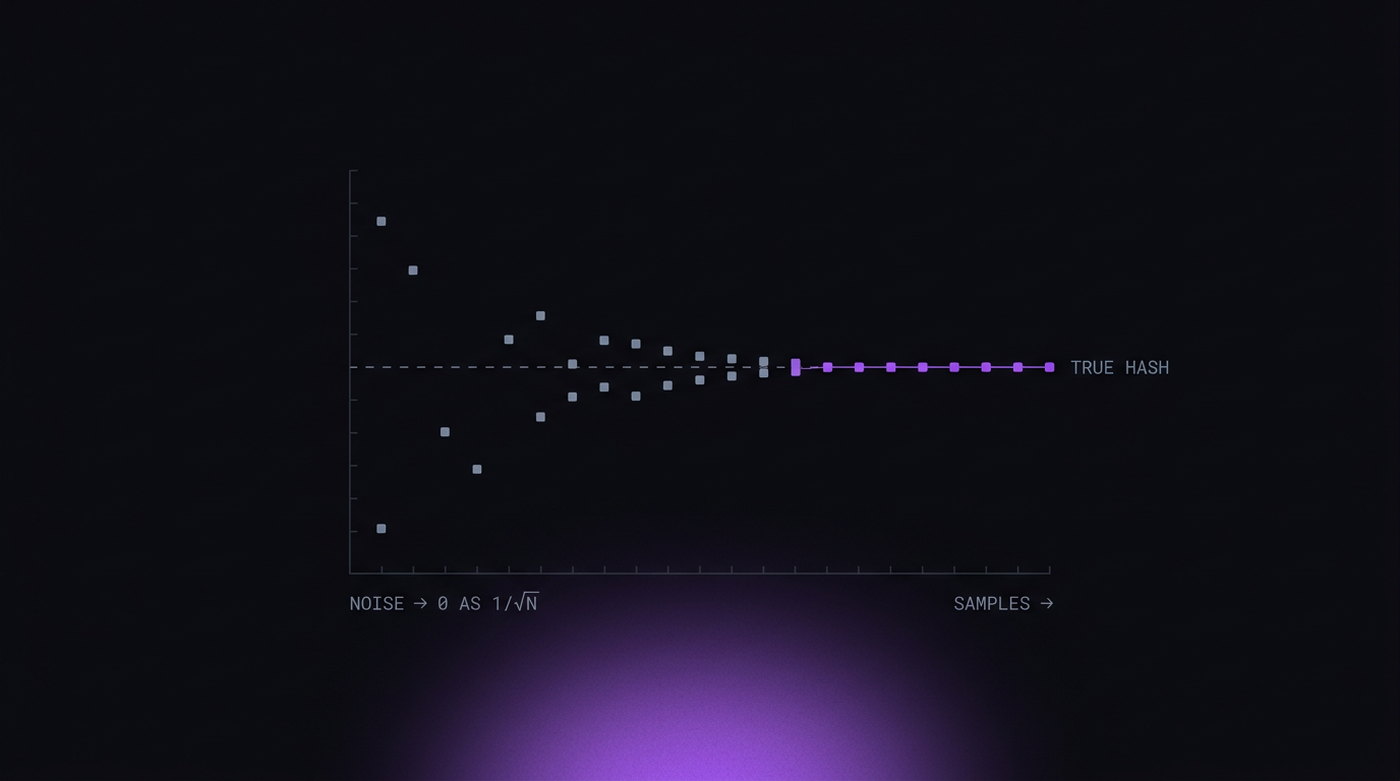
If the noise is random and zero-mean, then rendering n times and averaging pushes the result toward the true value at a rate of roughly √n. Twenty renders is usually enough to recover the underlying hash. The randomisation has cost the tracker a few milliseconds and cost you your anonymity anyway — while still flagging you as a randomiser.
Check whether the noise belongs
Randomised canvas is not inherently suspicious. Brave ships it by default — its "farbling" derives noise from a per-session, per-origin seed. Tor Browser prompts instead. What matters is whether the noise matches the browser you claim to be. Chrome does not randomise canvas. A client whose user agent says Chrome 147 and whose canvas changes per call has contradicted itself, and the contradiction is the finding, not the noise.
Vary the rendering path
Naive implementations hook toDataURL() and getImageData(). There are other ways out: toBlob(), createImageBitmap(), WebGL readPixels(), OffscreenCanvas inside a worker. If one path is noised and another is not, the two disagree — and that disagreement is stronger evidence than either value alone.
The worker path in particular
The last one deserves its own note, because it is where most implementations break.
OffscreenCanvas can be transferred into a Web Worker and rendered there. The worker has its own global scope and its own copy of the canvas APIs, and a page-level script injection does not reach it. If your noise is applied by injected JavaScript, the worker's canvas comes out clean.
const off = new OffscreenCanvas(280, 60);
const w = new Worker(url);
w.postMessage({ canvas: off }, [off]);
// the worker draws and hashes — untouched by any page-level hook
Now the page has two canvas hashes from the same device that do not match. There is no legitimate configuration in which that happens. It is the same structural problem described in the CDP article: anything applied from inside the page cannot reach a context that the page does not own.
What a correct implementation looks like
The goal is not "a different value every time". It is a different value than other people, and the same value every time for me. Stated that way, the requirements fall out on their own:
| Property | Requirement |
|---|---|
| Within one page load | Identical across every render |
| Across sessions | Identical for the same profile, forever |
| Across profiles | Different, and not by a constant offset |
| Across rendering paths | 2D, WebGL, OffscreenCanvas and worker all agree |
| Plausibility | Consistent with the GPU the profile claims |
The mechanism that satisfies all five is a seed. Fix a random seed when the profile is created, store it, and derive the pixel perturbation deterministically from it. Every render for that profile produces the same output because the seed is the same. Two profiles differ because their seeds do. And because the derivation happens where the pixels are produced — in the rasteriser, not in a hooked JavaScript method — every path gets the same treatment, worker included.
That last point is why this is difficult to do properly outside a modified engine. There is no supported way to reach the worker's rasteriser from a content script.
The case for leaving it alone
There is a real argument, which deserves stating fairly, for not touching canvas at all.
If you run one profile per physical machine, your genuine canvas hash is a perfectly ordinary value belonging to a perfectly ordinary computer. It is stable, consistent across every path, and matches your GPU because it is your GPU. Nothing about it invites a second look.
The moment that stops working is the moment you run a second profile on the same machine. Now both profiles hash identically, and any platform that fingerprints canvas can link them — which is precisely the outcome you were trying to avoid.
So the decision is not "noise or no noise". It is:
- One identity per machine — leave canvas alone. Real hardware, real hash, nothing to explain.
- Several identities per machine — you need per-profile canvas values, and they must be stable and consistent. Per-call randomisation is the worst of the three options, because it neither hides you nor stops the linking.
Testing it yourself
You do not need a detection vendor to check this. Open your browser's console on any page and run:
function h() {
  const c = document.createElement('canvas');
  const x = c.getContext('2d');
  x.textBaseline = 'top';
  x.font = '14px Arial';
  x.fillText('P8 canvas probe \u{1F511}', 2, 2);
  return c.toDataURL().slice(-32);
}
console.log(h(), h(), h());
Three identical strings is what a real browser gives you. Three different strings means per-call noise, and it means any site running the same three lines knows.
Then run it again after restarting the profile. The value should be the same as before if you want the profile to look like a device rather than a moving target — and different from what any of your other profiles produce. Cross-check the result against the rest of the fingerprint: a canvas that is stable but implies a GPU your WebGL strings do not claim has simply moved the contradiction somewhere else.