Why the user agent was frozen
The user agent string had become a fossil record. Mozilla/5.0 (Windows NT 10.0; Win64; x64) AppleWebKit/537.36 (KHTML, like Gecko) Chrome/147.0.0.0 Safari/537.36 claims to be Mozilla, Safari and KHTML, none of which is true, for compatibility reasons dating to the 1990s.
It was also a passive fingerprinting surface: every request broadcast the OS version, the CPU architecture and the exact browser build to every third party on the page, whether or not anyone needed it.
Google's answer was User-Agent Client Hints. The old string still exists but is progressively frozen — note that Windows NT 10.0 is now reported by Windows 11 as well, and the minor version fields are pinned to 0.0.0. The real detail moved to a new surface, split into two tiers by how identifying it is.
Low entropy and high entropy
Low entropy hints are sent on every request without anyone asking, because they reveal little:
Sec-CH-UA— the brand list, e.g."Chromium";v="147", "Not-A.Brand";v="8", "Google Chrome";v="147"Sec-CH-UA-Mobile—?0or?1Sec-CH-UA-Platform—"Windows","macOS","Linux"
High entropy hints are withheld until a server opts in via an Accept-CH response header, or until a script asks for them:
architecture—x86,armbitness—64model— the device model, meaningful mainly on AndroidplatformVersion— the OS version, and the field that distinguishes Windows 10 from 11fullVersionList— full brand versions, e.g.147.0.7727.56wow64— whether a 32-bit build is running under 64-bit Windows
The gating was designed as a privacy control. In practice, for first-party contexts Chrome hands over everything requested with no prompt and no visible signal, so a fingerprinting script simply calls getHighEntropyValues() with every field name and gets them all.
Where profiles contradict themselves
Three failures show up repeatedly, and all three are one line to detect.
The string was changed and the object was not
The single most common. A tool rewrites navigator.userAgent to claim Chrome 147 on macOS, and leaves navigator.userAgentData reporting Chrome 131 on Windows. The check:
const ua = navigator.userAgent;
const d  = await navigator.userAgentData.getHighEntropyValues(
  ['platform','platformVersion','architecture','fullVersionList']);
// ua says "Macintosh; Intel Mac OS X 10_15_7"
// d.platform === "Windows"   →  contradiction, no ambiguity
Windows 10 or Windows 11
Since the UA string reports Windows NT 10.0 for both, the only way to tell them apart is platformVersion: values below 13 mean Windows 10, 13 and above mean Windows 11. A profile that claims Windows 11 in every marketing sense but returns platformVersion: "10.0.0" is claiming Windows 10 where it counts — and its font set will be asked about Segoe UI Variable next.
The brand list is wrong
The GREASE entry — the deliberately fake brand like "Not-A.Brand" — exists to stop servers hard-coding the list. Its exact text and position change between Chrome versions, and the punctuation has varied over time: Not:A-Brand, Not.A/Brand, Not-A.Brand, with the version at 8, 24 or 99 depending on release. A brand list copied from an older build is a version mismatch sitting in plain sight beside a newer user agent.
The worker problem, again
navigator.userAgentData exists inside Web Workers and Service Workers. Those scopes are built by the engine on their own threads, and — as covered in the CDP article — a page-level override does not reach them.
// main thread: brands say 147
// worker: brands say whatever the binary really is
new Worker(URL.createObjectURL(new Blob([`
  navigator.userAgentData.getHighEntropyValues(['fullVersionList','platform'])
    .then(v => postMessage(v))
`], { type: 'text/javascript' })));
Any disagreement here is conclusive rather than suspicious. There is no browser configuration in which the window and a worker legitimately report different brand lists, because both read the same source.
This is the same structural point that keeps recurring across these articles, and it is worth stating once more plainly: a value that is decided by the engine can only be changed convincingly in the engine.
Headers and JavaScript have to agree too
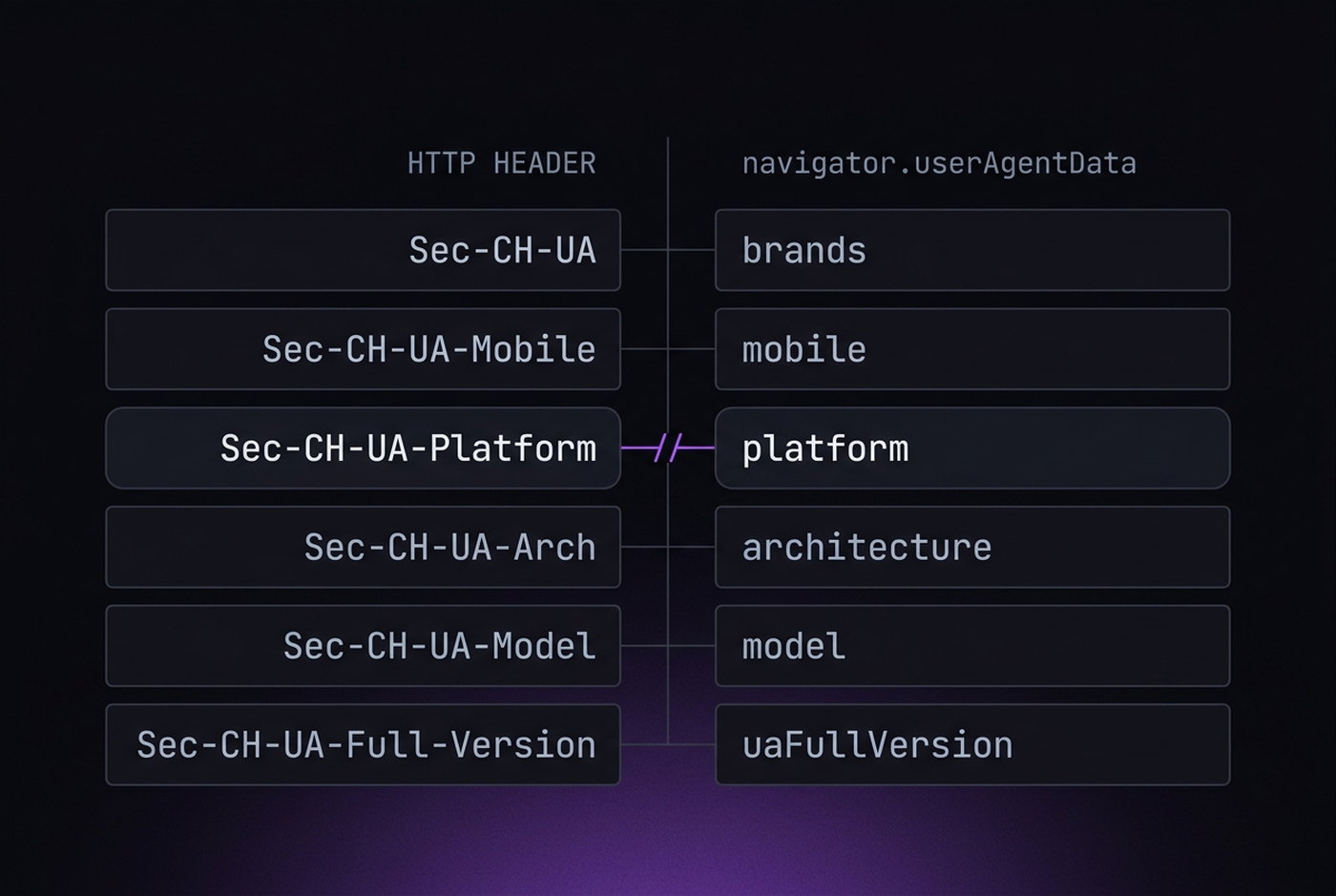
UA-CH exists in two places at once — HTTP headers and a JavaScript object — and they are produced by different parts of the browser. A tool that patches one and not the other creates a contradiction visible in a server log without any client-side script at all.
The pairs that must match:
| Header | JavaScript |
|---|---|
Sec-CH-UA | userAgentData.brands |
Sec-CH-UA-Platform | userAgentData.platform |
Sec-CH-UA-Mobile | userAgentData.mobile |
Sec-CH-UA-Platform-Version | platformVersion |
Sec-CH-UA-Full-Version-List | fullVersionList |
User-Agent | navigator.userAgent |
Six pairs, and the last one is the one everybody gets right. A useful discipline is to derive all of them from a single profile record rather than configuring them as separate fields — the same argument made in the consistency article, applied to one specific surface.
Auditing a profile
Run this in the profile you want to check and read every line against the user agent above it:
(async () => {
  const d = await navigator.userAgentData.getHighEntropyValues(
    ['architecture','bitness','model','platformVersion','fullVersionList','wow64']);
  console.log(navigator.userAgent);
  console.log(navigator.userAgentData.platform, navigator.userAgentData.mobile);
  console.log(navigator.userAgentData.brands);
  console.log(d);
})();
Four questions to ask of the output:
- Does the platform in the object match the platform in the string?
- Does the major version in
fullVersionListmatch theChrome/NNNin the string? - Is
platformVersionconsistent with the OS you intend to claim — 13 or higher for Windows 11? - Does a worker return the same answers?
browserleaks.com/client-hints shows both the header and JavaScript sides together, which makes the six pairs above easy to compare at a glance. It is the fastest way to find a half-applied spoof.