
One number decides most of it
Every IP address on the internet belongs to an Autonomous System, identified by an ASN. The ASN says who operates the block. AS16509 is Amazon. AS14061 is DigitalOcean. AS7922 is Comcast. AS22394 is Verizon Wireless.
Anti-fraud vendors maintain classifications of every ASN in use, refreshed continuously, tagging each as datacenter, business ISP, consumer ISP, mobile carrier, VPN, or hosting. That classification is applied before your request reaches an application, and it carries more weight than almost any browser-side signal.
Which means the difference between proxy types is not really about technology. All four move your packets the same way. The difference is what the ASN says about the address, and secondarily how many other people have used it recently.
The four types
Datacenter
Addresses from hosting providers — AWS, OVH, Hetzner, DigitalOcean. Fast, cheap, plentiful, and instantly recognisable. The ASN says "server", and no ordinary consumer browses Instagram from an AWS address.
Legitimately useful for: unauthenticated scraping of sites that do not care, API calls, internal testing, load generation, anything where you are not pretending to be a household. A poor choice for account work of any kind.
ISP (static residential)
The hybrid, and the most misunderstood of the four. The IP block is registered to a consumer ISP, so ASN lookups return Comcast or Cox — but the address is hosted on a server in a data centre. You get residential reputation with datacenter speed and, critically, a static address you keep.
Best for: long-lived logged-in accounts. The permanence is the point. An account that logs in from the same address for six months looks like a person with a home connection.
Honest caveat: because these blocks are leased in bulk to proxy providers, some are known and scored accordingly. Quality varies enormously between vendors, far more than for the other types.
Residential
Traffic routed through real consumer devices — home routers, laptops, phones — belonging to people who joined a provider's peer network, usually via an SDK bundled in a free app. The IP is genuinely a household address on a genuine consumer ASN.
Best for: tasks that need geographic breadth, or targets that are aggressive about ISP-range blocks. The trade-offs are real: latency is higher and variable, throughput depends on someone else's uplink, and the address can vanish when that person closes their laptop.
Mobile
Carrier IPs from real 4G/5G connections. The strongest reputation of the four, for a structural reason: mobile carriers put thousands of subscribers behind a single address through CGNAT. Blocking a mobile IP means blocking a neighbourhood, so platforms are extremely reluctant to do it, and shared use is expected rather than suspicious.
Best for: the hardest targets. The cost is the highest of the four and the address rotates when the carrier decides it does, not when you do.
Side by side
| Type | ASN reads as | Address | Typical latency | Relative cost |
|---|---|---|---|---|
| Datacenter | Hosting | Static | 10–40 ms | Lowest |
| ISP | Consumer ISP | Static | 20–60 ms | Low–medium |
| Residential | Consumer ISP | Rotating or sticky | 80–400 ms | Medium–high |
| Mobile | Mobile carrier | Carrier-controlled | 60–300 ms | Highest |
Latency figures are indicative, not promises — they depend far more on the distance between you, the exit and the target than on the category.
Rotation is usually the wrong default
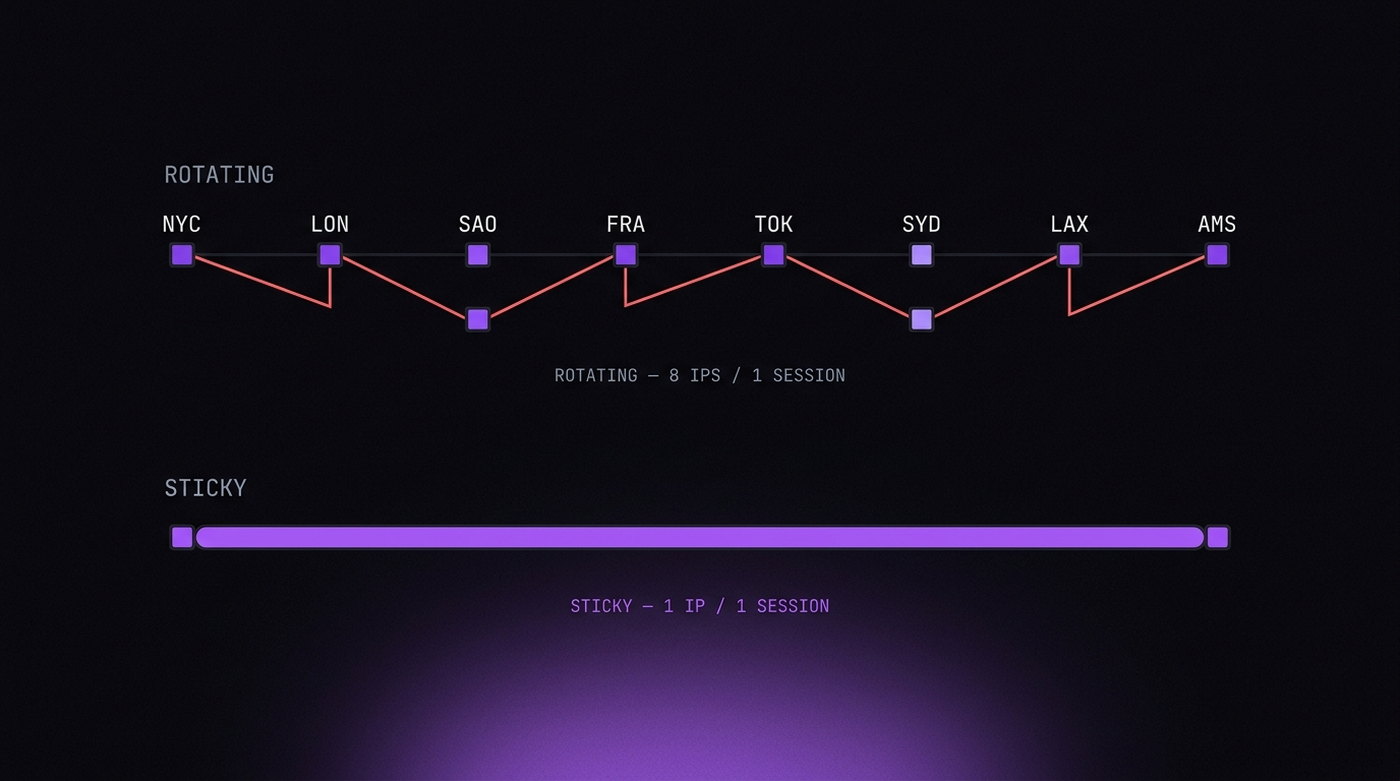
Providers sell rotation as a feature, and for scraping it genuinely is: a new address per request spreads load and dodges rate limits.
For account work it is close to the worst thing you can do. Consider what an account looks like when its IP changes every few minutes. A person who logs in from Ohio, loads a page from Texas, and posts from Oregon inside ten minutes has not travelled; they have triggered an impossible-travel rule. Session cookies issued to one address and presented from another are a textbook hijack pattern, and platforms treat them accordingly.
What a real account looks like is dull: the same address for weeks, occasionally changing when the ISP renews a lease or the person goes to a café. That is what sticky sessions exist to emulate — most residential providers let you hold an exit for 10, 30 or 60 minutes, and some for days.
The general rule worth internalising: one identity, one address, for as long as you can hold it. Rotate across identities, not within one.
The proxy has to match the browser
A clean address does not help if the browser sitting behind it tells a different story. Three pairings to verify every time, and they are the same ones covered in the consistency article:
- Timezone. A German exit with
America/New_Yorkis a mismatch that costs nothing to detect. - Language. A Japanese residential IP sending
Accept-Language: pt-BRis possible but unusual, and unusual is what gets sampled for review. - WebRTC. The one that leaks without telling you. STUN requests can go out over UDP and bypass the proxy entirely, handing the site your real address while every other signal says otherwise. Test it explicitly — details in the WebRTC article.
There is also a network-layer consideration most guides omit: a proxy that terminates TLS rewrites your handshake, and the site sees the proxy's fingerprint rather than Chrome's. SOCKS5 and HTTP CONNECT tunnels do not do this; MITM proxies do. See TLS and HTTP/2 fingerprinting for why that matters.
Checking an address before you trust it
Five minutes of checking beats a banned account. In order:
- ASN and type.
ipinfo.io/<ip>/jsonreturns the ASN, the organisation and a type field. If it says hosting and you were sold residential, stop there. - Reputation. Scamalytics, IPQualityScore and similar return a fraud score. High scores mean the address has been abused recently, whatever its category.
- Blacklists. Check DNSBLs if the account involves email at all.
- Geolocation agreement. Different databases disagree; MaxMind, IP2Location and ipinfo should at least agree on the country. Platforms use several.
- The actual target. Nothing substitutes for loading the site you care about and seeing whether you get a challenge.
One last piece of advice that will save more accounts than any of the above: test with a throwaway identity first. Providers rotate their pools, and a subnet that was clean last month may not be clean today. Burn a profile you do not mind losing before you put a valuable one behind a new address.