
Why it happens at all
WebRTC exists so that browsers can talk to each other directly — video calls, voice, peer-to-peer data — without relaying everything through a server. Direct connections are the entire point, and to make one your browser has to discover which addresses it can be reached on.
It does that by asking a STUN server. The browser sends a UDP packet to a public STUN endpoint, and the server replies with the source address it observed. That is your public IP, reflected back and handed to JavaScript as an ICE candidate.
The critical detail: this happens over UDP, outside the HTTP path. An HTTP or SOCKS proxy configured in the browser handles HTTP traffic. The STUN packet does not use it. Your pages load through the proxy, your WebRTC discovery does not, and nothing anywhere reports a problem.
That is what makes this failure mode different from the rest. A broken proxy produces errors. A WebRTC leak produces silence.
What a site actually sees
The whole attack is short enough to read in one go:
const pc = new RTCPeerConnection({
  iceServers: [{ urls: 'stun:stun.l.google.com:19302' }]
});
pc.onicecandidate = e => { if (e.candidate) console.log(e.candidate.candidate); };
pc.createDataChannel('');
pc.createOffer().then(o => pc.setLocalDescription(o));
Each candidate line contains an address and a type. Three types matter:
| Type | What it contains | Risk |
|---|---|---|
host | Your LAN address, e.g. 192.168.1.42 | Reveals network layout; mDNS mitigates |
srflx | Your public IP as STUN saw it | This is the leak that matters |
relay | A TURN server address | Reveals nothing about you |
If the srflx address differs from the address your HTTP requests come from, you have handed the site a contradiction it did not have to work for: the page thinks you are in Frankfurt and WebRTC says you are in Milan.
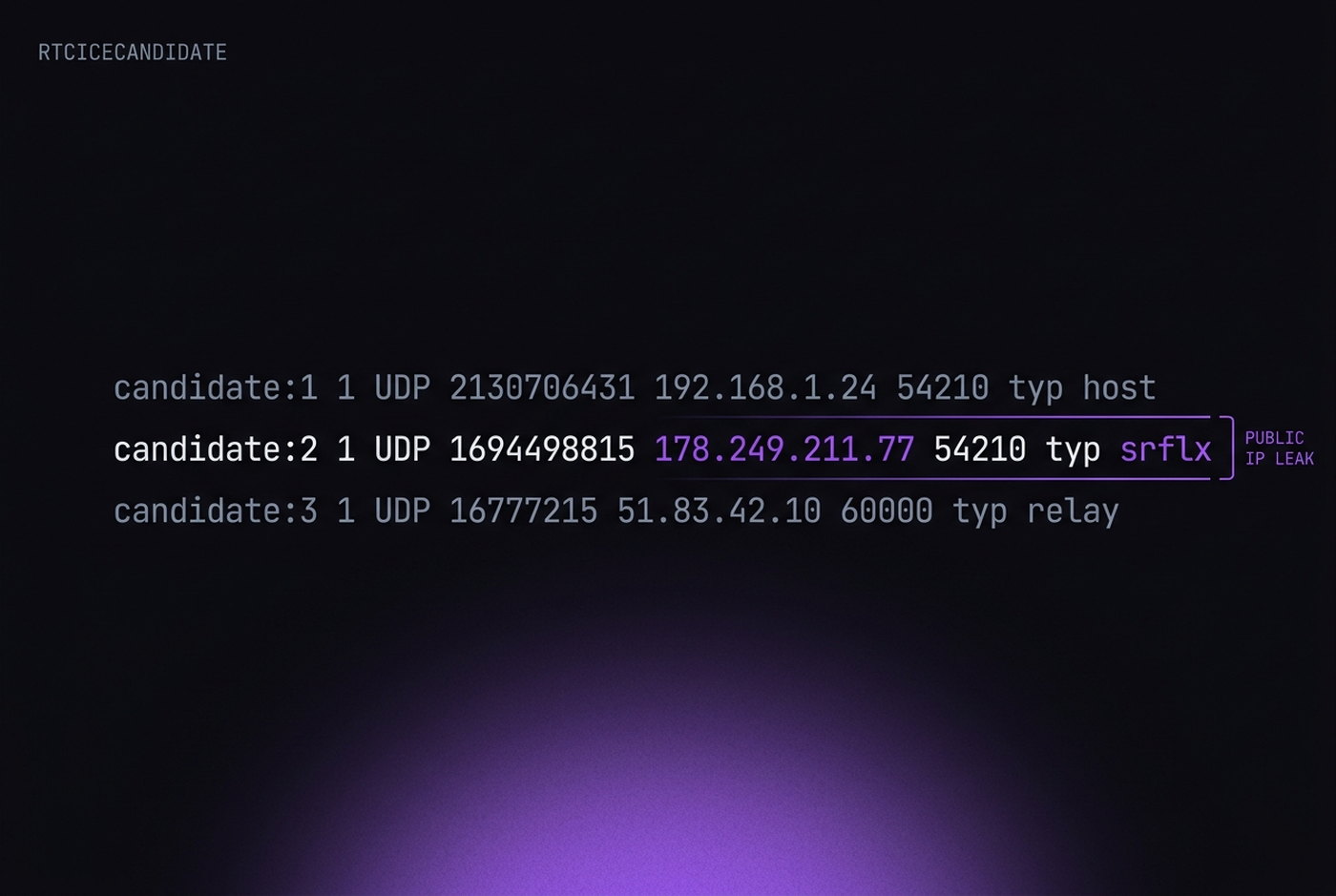
RTCPeerConnection. The host line is masked by mDNS and the relay line reveals nothing. Only srflx carries your public address.mDNS solves the smaller half
Chrome has shipped mDNS obfuscation for local addresses since version 76. Instead of 192.168.1.42, host candidates appear as a random UUID ending in .local. This is genuinely good and it is on by default.
It is also frequently misunderstood. mDNS only affects host candidates — your LAN address. It does nothing to srflx candidates, which are the ones carrying your public IP. Guides that tell you to enable chrome://flags/#enable-webrtc-hide-local-ips-with-mdns and call the problem solved are describing a fix for the less important half.
There is a second-order signal here too. The obfuscated .local hostname is stable for the browsing session, and the number of host candidates reflects how many network interfaces the machine has. A profile reporting six interfaces looks like a machine with several VPN adapters — not what an ordinary laptop looks like.
Four ways to handle it
Anti-detect browsers generally offer some version of these four. They are not equally good, and the best one depends on what you are doing.
Disabled entirely
No RTCPeerConnection, no candidates, no leak. Clean, but detectable: WebRTC has been standard in every browser for a decade, and a Chrome that lacks it is unusual. Fine for accounts that never touch calls or streaming. Wrong for anything that does — some sites now use WebRTC presence as a liveness check.
UDP disabled
The API exists and answers, but no UDP goes out, so no srflx candidate is produced. Less conspicuous than full removal, and it does close the leak. It also breaks real WebRTC functionality, which may or may not matter.
Real
Pass everything through untouched. This is correct in exactly one situation: when your proxy handles UDP too. A SOCKS5 proxy with UDP association, or a system-level VPN, routes the STUN packet through the same exit as your HTTP traffic, and the reflected address is the proxy's. In that setup, real WebRTC is the most authentic option available. Verify it rather than assuming it.
Altered
Replace the discovered public address with the proxy exit before it reaches JavaScript. WebRTC keeps working, candidates are present in the usual quantity, and they agree with the HTTP path. This is the most convincing configuration when done at the engine level — the substitution has to happen where candidates are generated, not in a content script, or the two disagree and you are back where you started.
Testing it properly
Most WebRTC "leak tests" only report whether a public address appeared. That is not the question. The question is whether it matches your proxy.
The reliable procedure takes two minutes:
- Note the exit address the proxy is supposed to give you.
- Load
browserleaks.com/webrtcin the profile and read the public IP row. - Compare. Equal is fine. Different is a leak, even if the different address is not your home IP — a datacenter address showing up beside a residential HTTP path is its own contradiction.
- Repeat with the profile's proxy switched off. If the value does not change, WebRTC is not going through the proxy at all and the earlier match was luck.
That fourth step is the one people skip, and it is the one that catches a misconfiguration.
Where it fits among everything else
WebRTC deserves its reputation, but it is worth keeping in proportion. It is one signal, and it is one of the easier ones to close permanently: configure it once per profile, verify it once, and it stays fixed.
What it is not is a substitute for the rest. A profile with perfect WebRTC handling and an inconsistent fingerprint will be caught by the inconsistency. A profile behind a datacenter proxy will be caught by the ASN whether WebRTC leaks or not.
The reason to fix it first is not that it is the most important signal. It is that it is the only one that fails silently, and silent failures are the ones you discover from a suspension email.