Two introductions before any script runs
Everything written about browser fingerprinting concerns things a page can measure: canvas, WebGL, fonts, screen size. All of it happens after the connection is up.
By that point your client has already made two statements about itself that it cannot take back. The TLS ClientHello announces which cipher suites, extensions, elliptic curves and ALPN protocols it supports, and in what order. The HTTP/2 preamble announces its SETTINGS frame values, its window update size, and the order in which it sends header pseudo-fields.
Neither is a claim about identity. Both are a consequence of which TLS library and which HTTP stack were compiled into the binary. That is exactly what makes them useful to a detection vendor: a user agent string is a sentence anyone can type, and a ClientHello is a structure you have to actually be built from.
JA3, and why Chrome broke it
JA3, published by Salesforce in 2017, takes five fields out of the ClientHello — TLS version, cipher suites, extensions, elliptic curves, and curve formats — concatenates them in wire order, and takes an MD5. The result is a 32-character hash that is stable for a given client build.
It worked well for six years, and then Chrome killed it. In Chrome 110, shipped January 2023, Google began randomising the order of TLS extensions on every connection, explicitly as an anti-ossification and anti-fingerprinting measure. Because JA3 hashes the extension list in wire order, a randomised order produces a different hash every time. Chrome went from one JA3 to effectively unlimited JA3s overnight.
This had a consequence nobody in the anti-detect space enjoyed pointing out: for a while, a stable JA3 was itself suspicious, because real Chrome no longer had one.
JA4 and the JA4+ family
JA4, published by FoxIO in 2023, fixes the ordering problem the obvious way — it sorts the ciphers and extensions before hashing. Randomise the wire order all you like; the sorted list is the same, so the fingerprint is stable again.
It is also readable rather than opaque. A JA4 is a 36-character string in three parts, and the first part is human-legible: protocol and TLS version, SNI presence, cipher and extension counts, and the ALPN value. You can eyeball a JA4 and tell that a client offered 15 ciphers over TLS 1.3 with h2 negotiated, before you look up the hash at all.
JA4 is the anchor of a wider family, and two siblings matter here:
- JA4H fingerprints the HTTP request itself — method, version, header names in order, cookie presence, and the
Accept-Languagevalue. It catches a client whose headers do not match the browser it claims to be. - JA4L measures latency between handshake steps. It is the hardest of the set to forge, because it is not a value you emit — it is the physical time your stack takes to respond, and an intermediary that terminates and re-establishes TLS changes it whether you want it to or not.
As of 2026, JA4 is in production at Cloudflare, Akamai and AWS WAF, among others. Treat it as universally deployed rather than as an emerging technique.
HTTP/2: the Akamai fingerprint
HTTP/2 gives away as much as TLS does, and it is checked less often by the people trying to blend in.
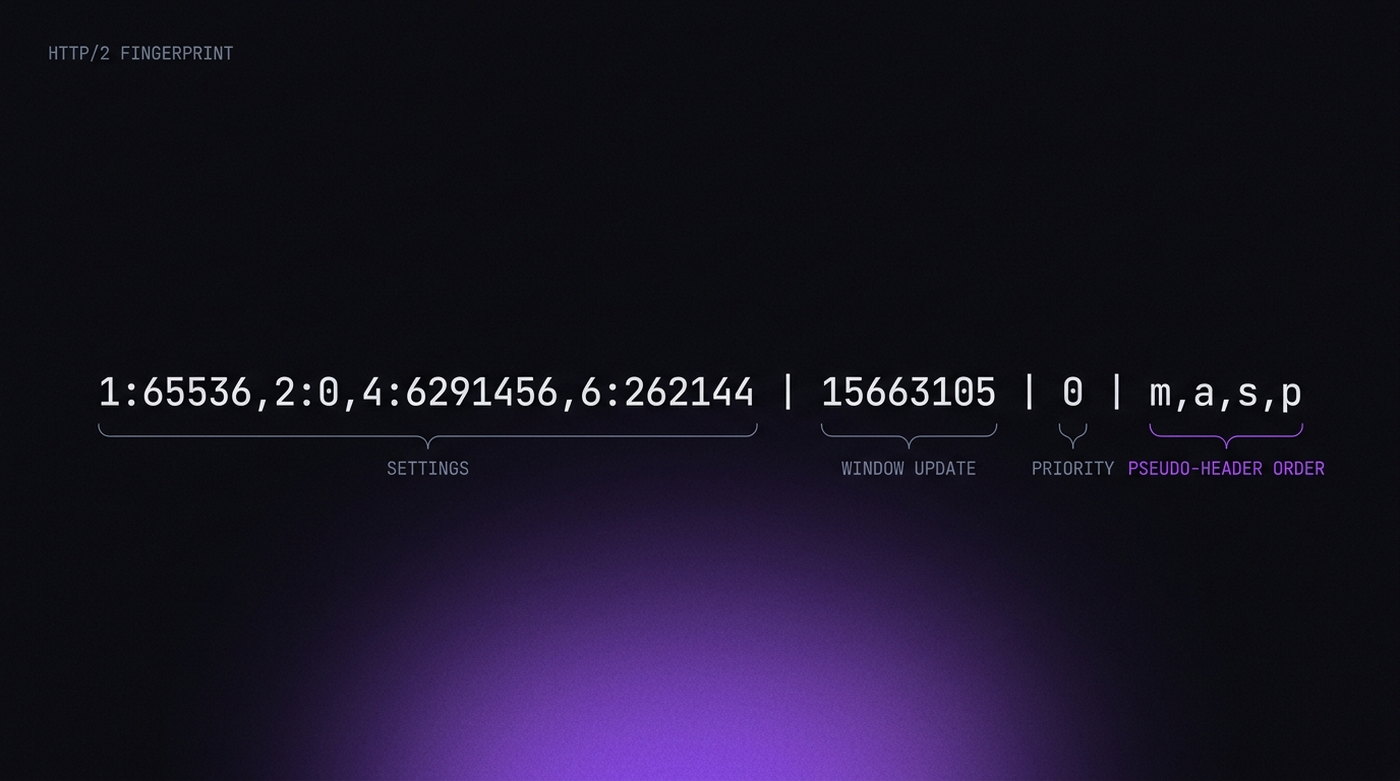
The format most commonly used is Akamai's, and it has four parts joined by pipes:
- SETTINGS frame — the parameters the client sends and their values, in order. Chrome, Firefox and Safari each send a different set. So does every HTTP library.
- WINDOW_UPDATE — the initial connection-level window increment.
- Priority frames — whether the client sends them and how it structures the tree.
- Pseudo-header order — the sequence of
:method,:authority,:scheme,:path. Chrome usesm,a,s,p. Most libraries do not.
That last one is almost comically effective. The HTTP/2 spec does not mandate an order, so implementations picked their own and never changed. A request claiming to be Chrome that sends its pseudo-headers in a different sequence has contradicted itself before the server has read a single real header.
Why you cannot fix this from the browser UI
This is the part worth being blunt about, because it cuts against a lot of marketing — including, in fairness, marketing in this industry generally.
Your anti-detect browser's fingerprint settings — canvas mode, WebGL vendor, timezone, fonts — operate inside the renderer. The TLS handshake happens in the network stack, in a different process, before the renderer is involved. There is no setting that changes it, because there is nothing in the profile to change: the handshake is produced by BoringSSL as compiled into the binary.
Which leads to the one genuinely good piece of news in this article: if you are driving a real Chromium build, your TLS and HTTP/2 fingerprints are already Chrome's. Puppeteer over real Chrome, Playwright over real Chrome, and any Chromium-based anti-detect browser all present the same handshake as the Chrome on your desktop, because it is the same code. Automation flags do not change it.
The clients that get caught at this layer are the ones that are not browsers at all: requests, axios, httpx, Go's net/http, curl. They set a Chrome user agent and then hand over a ClientHello that no Chrome has ever produced. That is the mismatch JA4 was built to catch.
What proxies do to the handshake
Your proxy choice matters here, and it is a distinction most guides get wrong.
| Proxy type | Effect on TLS fingerprint |
|---|---|
| SOCKS5 | None. Forwards TCP bytes without touching them; your ClientHello reaches the server intact. |
| HTTP CONNECT | None. Opens a tunnel; TLS is negotiated end to end through it. |
| MITM / TLS-terminating | Total. The proxy performs its own handshake, so the server sees the proxy's fingerprint, not yours. |
The failure mode is the last row, and it is not always something you opted into. Corporate inspection appliances, some "SSL-optimising" proxy services, and any local debugging tool of the Charles or Fiddler family all terminate TLS. If a browser's fingerprint suddenly reads as something exotic, check for an interceptor before you check anything else.
Worth adding: JA4L makes even a transparent proxy partly visible, because the extra hop costs time. This is not something you can configure away. It is a reason to prefer a proxy that is geographically near the exit you are claiming, rather than one routed through three continents.
Flags that do and do not matter
A recurring question is whether Chrome launch flags change the handshake. Mostly they do not, and the exceptions are worth knowing.
No effect on TLS: --headless, --no-sandbox, --disable-gpu, --disable-dev-shm-usage, window sizing, and the entire family of renderer-side flags. These change how pages are drawn and how the process is sandboxed, not how BoringSSL greets a server.
Real effect: --disable-http2 forces a downgrade to HTTP/1.1, which removes the HTTP/2 fingerprint and replaces it with something rarer and therefore more conspicuous — a modern Chrome that refuses h2 is unusual. --ssl-version-min and friends alter what is offered in the ClientHello directly. Options that disable QUIC change which protocols are attempted and in what order.
The general rule: if a flag sounds like it touches the network stack, assume it changes your fingerprint and verify before shipping it.
How to check yours
Three public endpoints will tell you where you stand in under a minute:
- tls.peet.ws/api/all — returns your JA3, JA4, the full Akamai HTTP/2 fingerprint and your header order, as JSON. The most complete single view.
- browserleaks.com/tls — the same ground with a friendlier presentation.
- scrapfly.io/web-scraping-tools/ja3-fingerprint — useful for comparing a client against known-good browser signatures.
The test that actually matters takes two windows. Open one of those URLs in your ordinary desktop Chrome, then open it again through the tool you are evaluating. Compare the JA4 and the HTTP/2 fingerprint field by field. If they match, this layer is not your problem and you should spend your attention on the CDP surface and on whether your fingerprint hangs together instead. If they differ, no amount of canvas configuration will help you.