
The Problem: You're Being Tracked Without Cookies
If you think clearing cookies and using incognito mode makes you anonymous, you're about a decade behind the tracking industry.
Modern websites don't need cookies to identify you. They use a technique called browser fingerprinting -- collecting dozens of data points from your browser and combining them into a unique identifier. Your screen resolution, installed fonts, GPU model, audio processing characteristics, timezone, language settings, and even the way your browser renders invisible graphics on a hidden canvas -- all of it is collected, hashed, and stored.
The result is a fingerprint that's unique to your specific browser on your specific machine. Studies have shown that browser fingerprints are unique for over 90% of users. And unlike cookies, you can't clear a fingerprint. It's derived from your hardware and software configuration. As long as those stay the same, the fingerprint stays the same.
This is the problem anti-detect browsers were built to solve.
What an Anti-Detect Browser Actually Does
An anti-detect browser lets you create multiple isolated browser profiles, each with its own unique fingerprint. When a website fingerprints Profile A, it sees a Windows 11 machine in New York with an NVIDIA GPU. When it fingerprints Profile B, it sees a macOS laptop in London with an Intel GPU. Same computer, same user -- but completely different digital identities.
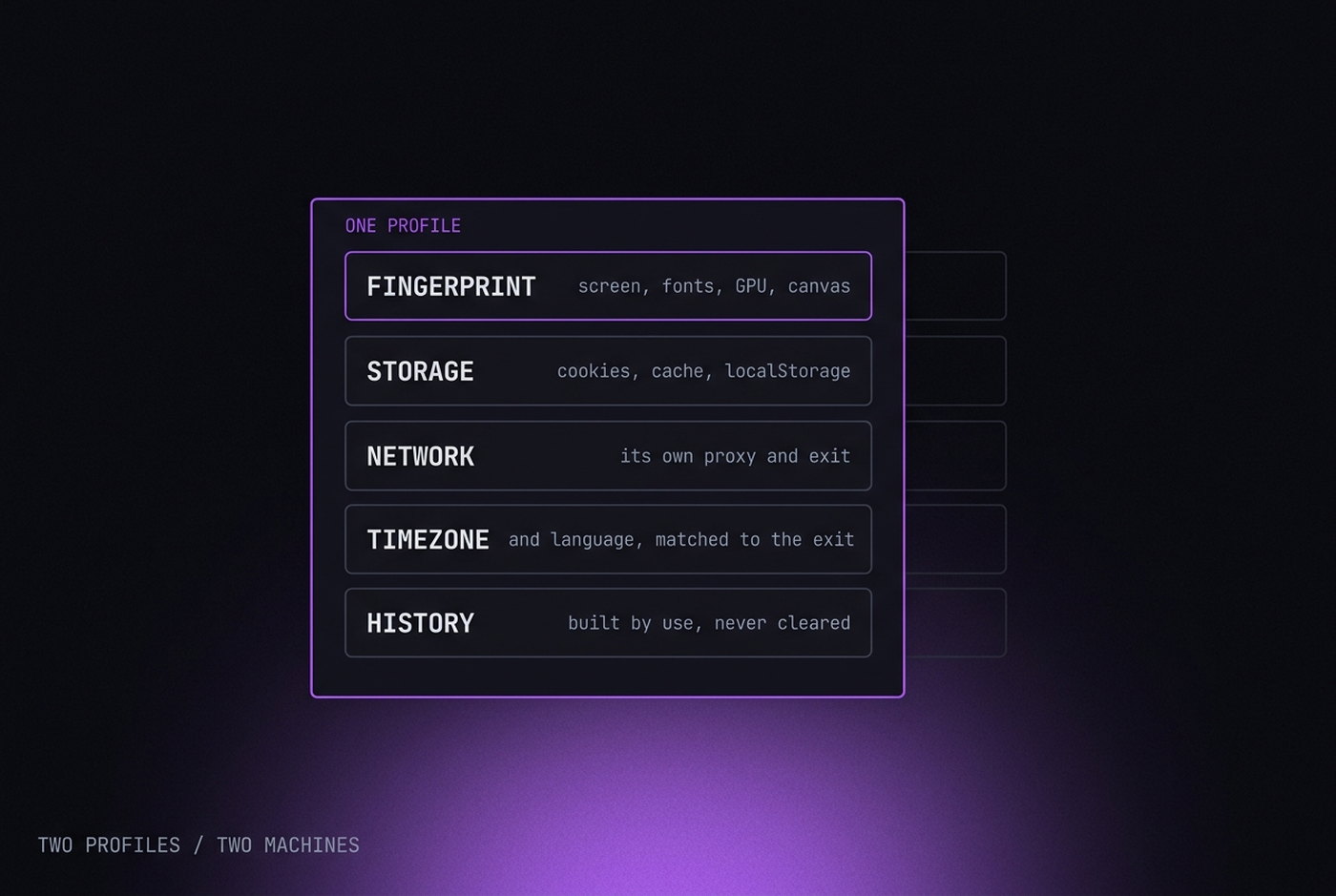
Each profile has its own:
- Browser fingerprint -- canvas hash, WebGL renderer, audio fingerprint, screen resolution, timezone, language, user agent, and dozens more parameters.
- Cookies and local storage -- completely isolated per profile, so sessions never leak between identities.
- Proxy connection -- each profile can route traffic through a different IP address in a different country.
- Browser history and cache -- separate per profile. Nothing is shared.
The key word is isolation. Regular browsers have one identity. Anti-detect browsers have as many as you need, and each one looks like a completely different person on a completely different device.
How It Works Under the Hood
There are two fundamentally different approaches to building an anti-detect browser, and the difference matters more than most people realize.
Approach 1: Patching (the common way)
Most anti-detect browsers take a stock Chromium or Firefox build and inject JavaScript overrides to spoof fingerprint values. When a website calls navigator.hardwareConcurrency, the script intercepts the call and returns a fake value. When a website tries to render a canvas fingerprint, the script adds noise to the output.
This works -- until it doesn't. The problem is that JavaScript-level overrides are detectable. Advanced fingerprinting systems check for inconsistencies between what JavaScript reports and what the underlying engine actually does. If your navigator says you have 4 CPU cores but certain performance benchmarks suggest 8, the fingerprint is flagged as spoofed. If your WebGL renderer string says "Intel" but the actual rendering behavior matches NVIDIA, that's a red flag.
Approach 2: Engine-level modification (the hard way)
The more robust approach is to modify the Chromium source code itself -- changing how the browser generates fingerprint values at the C++ level, before any JavaScript can observe them. When a website calls canvas.toDataURL(), the browser engine itself produces the modified output. There's no JavaScript override to detect because the modification happens inside the engine.
This is significantly harder to build and maintain. It requires a team that understands the Chromium codebase deeply enough to modify rendering pipelines, audio processing, and dozens of other subsystems without breaking anything. And every time Google releases a new Chromium version, all those changes need to be carefully merged.
P8 takes the engine-level approach. The custom Chromium engine modifies fingerprint generation at the source code level -- not through JavaScript patches that detection systems can spot.
Anti-Detect Browser vs. VPN vs. Incognito Mode
These three tools are often confused, but they solve completely different problems:
| Feature | Incognito | VPN | Anti-Detect Browser |
|---|---|---|---|
| Hides your IP address | No | Yes | Yes (with proxy) |
| Isolates cookies between sessions | Partially | No | Yes |
| Changes browser fingerprint | No | No | Yes |
| Multiple simultaneous identities | No | No | Yes |
| Defeats browser fingerprinting | No | No | Yes |
| Persists sessions across restarts | No | N/A | Yes |
Incognito mode starts a clean session with no cookies or history, but your fingerprint is exactly the same as your normal browsing session. Websites can still identify you. And once you close the window, everything is gone -- there's no way to resume a session.
VPNs hide your IP address, but they don't change your browser fingerprint at all. If you log into two different accounts from the same browser with a VPN, the website can still link them through your fingerprint. And since many people share the same VPN IP addresses, some platforms actually flag VPN traffic as suspicious.
Anti-detect browsers are the only tool that addresses the fingerprint layer. They don't just hide your IP -- they make each browser profile look like a completely different person using a completely different computer.
Who Uses Anti-Detect Browsers (and Why)
Anti-detect browsers have a reputation problem. They're often associated with fraud, and some vendors lean into that image. But the reality is that most users have entirely legitimate reasons for needing multiple isolated browser identities.
Media buyers and advertisers
Running ad campaigns across multiple ad accounts is standard practice in performance marketing. Platforms like Meta, Google, and TikTok limit how much a single account can spend, and a single account ban can wipe out months of optimized campaigns. Media buyers use anti-detect browsers to manage multiple ad accounts, each with its own fingerprint and proxy, so that a problem with one account doesn't cascade to the rest.
E-commerce sellers
Marketplace sellers on Amazon, eBay, and similar platforms often operate multiple storefronts. Some platforms restrict this; sellers use anti-detect browsers to keep each store isolated. It's also a backup strategy -- if one store gets suspended due to a policy dispute, the other stores continue operating.
Social media managers
Agencies managing social accounts for multiple clients need isolation between those accounts. Logging into 20 different Instagram accounts from the same browser fingerprint is a fast way to get all of them flagged. Anti-detect browsers give each client account its own isolated environment.
Web scraping and OSINT
Scraping at scale requires rotating not just IP addresses but also browser fingerprints. Sophisticated anti-bot systems like Cloudflare, DataDome, and PerimeterX fingerprint the browser itself, not just the IP. An anti-detect browser with a realistic fingerprint and a residential proxy is far harder to block than a headless script.
Privacy-conscious individuals
Some people simply don't want their browsing activity linked across websites. They use separate browser profiles to compartmentalize their digital life -- one for work, one for personal, one for finances -- with each profile having a distinct fingerprint so that data brokers can't build a unified profile.
What to Look for When Choosing One
The market is crowded. Here's what actually matters:
Engine-level fingerprinting vs. JavaScript patches. As discussed above, engine-level modifications are harder to detect. Ask the vendor how their fingerprinting works. If they can't explain it clearly, or if they talk about "JavaScript injection" or "browser extensions," that's a patching approach.
Fingerprint consistency. A good anti-detect browser doesn't just randomize values -- it generates consistent, realistic fingerprint configurations. A profile claiming to be Windows 10 should have Windows-specific fonts, DirectX-compatible WebGL strings, and Windows-style path separators. Inconsistencies between fingerprint parameters are the #1 reason profiles get flagged.
Proxy integration. Proxies are essential. A different fingerprint with the same IP address is still suspicious. The best anti-detect browsers have built-in proxy management -- and ideally a built-in proxy marketplace so you don't need to deal with external providers.
Profile persistence. Your profiles need to survive restarts. Cookies, local storage, IndexedDB, service workers -- everything should be saved and restored exactly as it was. If a website's session check fails because your cache was wiped, you'll get flagged.
Update frequency. Chromium releases a new stable version roughly every 4 weeks. Your anti-detect browser needs to keep up. Running a browser version that's 3 months old is itself a fingerprint signal -- very few real users run outdated browsers.
Team features. If you're working with a team, you need secure profile sharing. The ability to export an encrypted profile -- with its fingerprint, cookies, and proxy config -- and import it on a teammate's machine without breaking the session is critical for agencies and teams.
Common Mistakes That Get You Detected
Even with a good anti-detect browser, users make mistakes that undermine their setup:
- Using datacenter proxies. Datacenter IPs are flagged instantly by most platforms. Use residential or ISP proxies for any account that needs to look like a real user.
- Fingerprint-proxy mismatch. If your profile fingerprint says you're in Germany but your proxy IP is in Brazil, that's an instant red flag. Always match the proxy location to the fingerprint's timezone and language settings.
- Sharing cookies across profiles. Importing the same cookies into multiple profiles links those profiles together. Each profile should have its own session.
- Logging into multiple accounts from the same profile. One profile = one account. Always. Logging into a second account, even briefly, creates a link between those accounts in the platform's database.
- Skipping warmup. A brand-new profile with no browsing history that immediately logs into a platform looks suspicious. Warm up profiles by browsing normally for a while before using them for anything important.
- Ignoring DNS leaks. If your browser's DNS requests go through your real ISP instead of the proxy, your real location is exposed. Make sure DNS traffic is routed through the proxy.
The Bottom Line
An anti-detect browser is the only tool that addresses the full spectrum of browser-based tracking: cookies, fingerprinting, IP address, and behavioral signals. VPNs cover the IP. Incognito covers the cookies (temporarily). Neither touches the fingerprint -- and in 2026, the fingerprint is what matters most.
If you need to manage multiple online identities -- whether for advertising, e-commerce, social media management, scraping, or personal privacy -- an anti-detect browser is not optional. It's the foundation.
The question isn't whether you need one. It's which one is built well enough to actually work.