
Two headless modes, one reputation
Until Chrome 112, --headless meant the old headless: a separate binary path that was not really Chrome. It had its own user agent containing the string HeadlessChrome, no extension support, no chrome.runtime, no plugin list, and a rendering path that skipped large parts of the real pipeline. Detecting it was a one-liner.
Chrome 112 shipped new headless (--headless=new, and since Chrome 132 simply --headless). This is the real browser with the window not drawn. Extensions work, the plugin list is populated, chrome.runtime exists, and the user agent no longer announces itself. It closed nearly every signal the old mode leaked.
The reputation stuck anyway, and mostly for good reason. New headless removed the easy tells. What it did not remove is the layer beneath them.
What still gives it away
SwiftShader, the session-ender
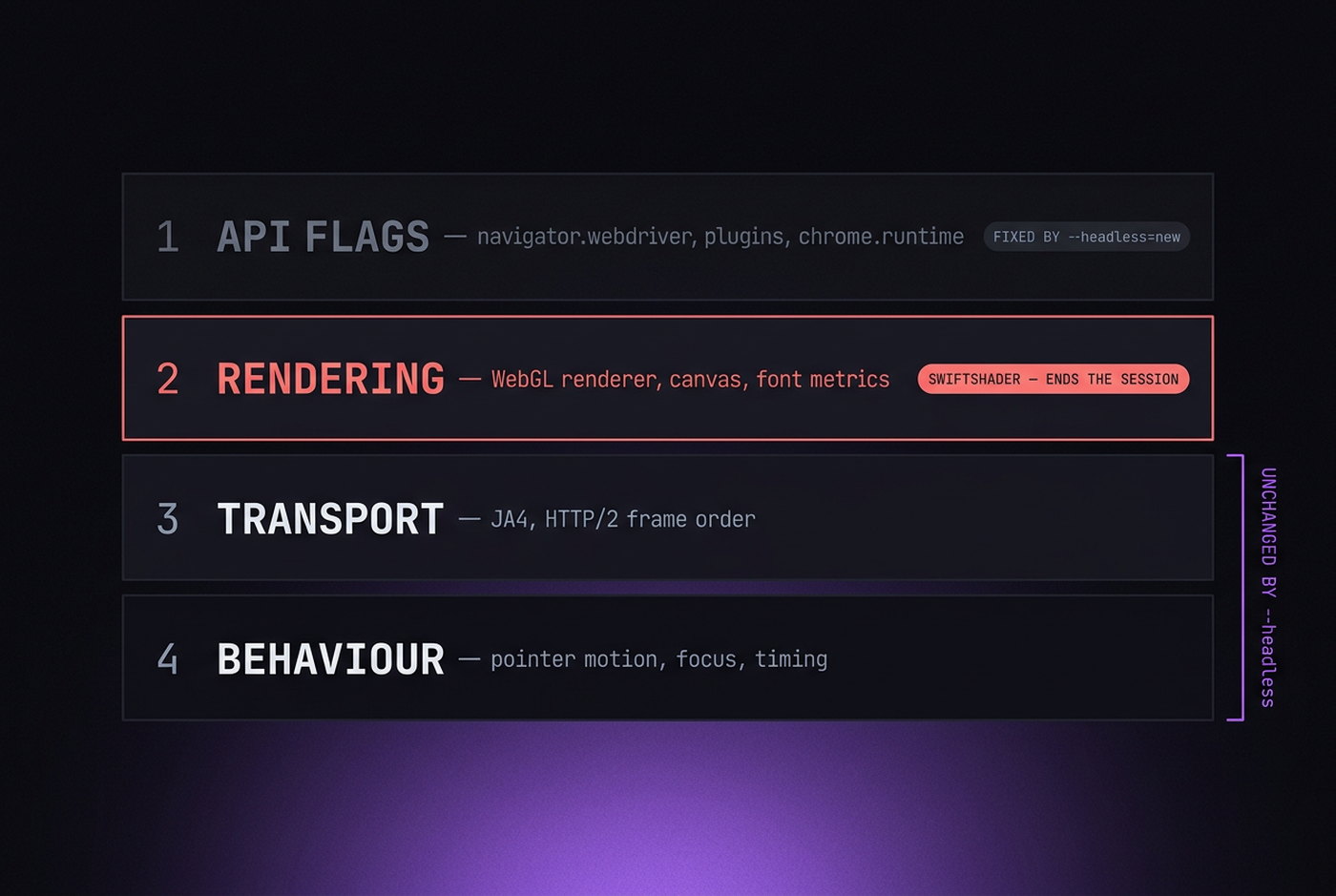
The single most reliable signal, and the one most people trip over. Without a GPU — which is the normal state of a server — Chrome falls back to software rasterisation, and WebGL reports:
UNMASKED_VENDOR_WEBGL   → "Google Inc. (Google)"
UNMASKED_RENDERER_WEBGL → "ANGLE (Google, Vulkan 1.3.0 (SwiftShader Device ...))"
That pair exists on zero consumer devices. Not "rarely" — zero. Nobody browses Instagram on software rendering. This is not a probabilistic signal that raises a score; it is a categorical one that ends the session.
It is also the reason --disable-gpu is such bad advice for this use case. The flag is widely copied from Docker troubleshooting threads where it fixes a crash, and it forces exactly the fallback above.
The window that is not there
Headless still has to invent a window, and the invention shows. outerWidth and outerHeight often equal innerWidth and innerHeight, because there is no chrome to account for — a real desktop Chrome has roughly 16 pixels of horizontal and 85 to 90 of vertical difference. screenX and screenY sit at zero. screen.availHeight equals screen.height, meaning no taskbar or dock exists anywhere on the machine.
Nothing ever moves
No mouse movement, no scroll inertia, no focus and blur as the user switches windows, no visibilitychange when a tab is backgrounded. Cloudflare Turnstile and its peers watch these continuously, not as a single check. A session with a clean fingerprint and zero input events is a session that has passed every static test and failed the only dynamic one.
The stack underneath
Headless does not change TLS or HTTP/2 fingerprints — that is genuinely good news, since a real Chromium build gives you real Chrome handshakes either way. It also does not change the CDP surface, which is where most automation is actually caught. Switching modes moves neither.
Why stealth plugins stopped working
puppeteer-extra-plugin-stealth and its descendants apply a set of JavaScript patches at document start: hide webdriver, populate navigator.plugins, fake chrome.runtime, and so on. In 2019 that was often enough.
It is not now, for a structural reason rather than a maintenance one. Every patch is a JavaScript override, and JavaScript overrides have a shape. Native getters stringify as [native code]; replacements do not. Prototype properties do not appear as own properties; replacements do. And no page-level script reaches a Web Worker's scope, so any value patched on the main thread disagrees with the worker's copy.
Published detection benchmarks in 2026 report near-total identification of stealth-plugin sessions — one vendor puts raw Playwright at 98.2% and stealth-mode commercial browserless sessions at 100%, at false-positive rates under 1%. Those numbers are from a company selling detection and should be read with that in mind, but the direction is not in dispute.
The plugins are not badly written. They are working at a layer that cannot express the answer.
The option that is not on the menu
The framing "headless or headful" hides the choice that actually works: headful Chrome on a virtual display.
On Linux, run Xvfb — a real X server that renders to memory instead of a monitor. Chrome launches with no --headless flag at all. It is a full browser, drawing a full window, with real GPU rendering if the host has one. There is no headless mode to detect because there is no headless mode.
Xvfb :99 -screen 0 1920x1080x24 &
DISPLAY=:99 google-chrome --window-size=1920,1080
What this fixes: the SwiftShader signal (with a GPU present), the window geometry signals, the missing chrome, availHeight, and the entire class of "there is no display" tells. What it does not fix: CDP leaks, and behaviour. Those need separate work.
The cost is a few dozen megabytes of RAM per instance and one line in your provisioning script. Compared with maintaining a stealth patch set against a moving target, it is close to free.
When headless is still correct
None of this makes headless useless. It makes it the wrong tool for one specific job.
Headless is fine for: internal testing, screenshot and PDF generation, crawling your own properties, scraping sites with no bot defence, CI pipelines, link checking, uptime monitoring. Anywhere nobody is trying to identify you, headless is faster and lighter and you should use it.
Headless is the wrong tool for: anything behind Cloudflare, Akamai, DataDome or PerimeterX; anything involving a logged-in account on a platform that cares; anything where being classified as automation has a cost.
The distinction is not technical sophistication. It is whether there is an adversary.
A short diagnostic
If you want to know where your current setup stands, four checks in order of how much they tell you:
- WebGL renderer. Read
UNMASKED_RENDERER_WEBGL. If it mentions SwiftShader, stop and fix that before anything else; nothing further matters. - Window geometry.
outerHeight - innerHeightshould be roughly 85 to 90 on desktop Chrome, andscreen.availHeightshould be smaller thanscreen.height. - CreepJS. Load it and read the headless and lie-detection sections. It is blunt about what it finds.
- A real target. Load a site you actually care about and see whether you get a challenge. Every synthetic test is a proxy for this one.
Run the same four against a browser you drive by hand on the same machine. The differences between the two lists are your work queue.