
They solve three different problems
Most confusion in this area comes from one assumption: that these three tools are stronger and weaker versions of the same thing. They are not. Each hides something different, and none of them hides everything.
The short version:
| Tool | Hides you from | Does nothing about |
|---|---|---|
| Incognito | Other people using your computer | The websites you visit |
| VPN | Your internet provider, and your location | Everything the browser tells a site about itself |
| Separate profile | Websites linking your accounts | Your provider, and how you behave |
Read that table twice and most of the questions people have about this answer themselves. The rest of this article is the longer version.
Incognito hides you from your family, not from Google
Incognito mode — Private Browsing in Firefox and Safari — does exactly two things. It does not save your history, and it throws away cookies when you close the window.
That is genuinely useful. If you share a laptop, incognito keeps your browsing off the address bar and out of the history list. If you want to log into a second account without logging out of the first, it works for that too.
What it does not do is make you anonymous to the site you are visiting. Chrome itself says so on the new tab page, in a notice most people scroll past. The website still sees your IP address. It still sees everything your browser reports about itself. And within a single incognito session it still sets cookies normally — closing the window is what clears them.
If a site could recognise you in a normal window, it can usually recognise you in an incognito one. The difference is only whether your own computer keeps a record.
There is a second-order problem too. Some sites can detect that you are in a private window, because the storage APIs behave slightly differently. On a handful of platforms that alone is treated as mildly suspicious.
A VPN changes where you appear to be
A VPN encrypts your traffic and routes it through a server somewhere else. Two consequences follow, and both are real.
Your internet provider stops being able to see which sites you visit — they see an encrypted tunnel to the VPN and nothing more. And the sites you visit see the VPN server's address instead of your home one, which is why a VPN can make a service think you are in another country.
That is where the usefulness ends. A VPN changes your address. It changes nothing about your browser.
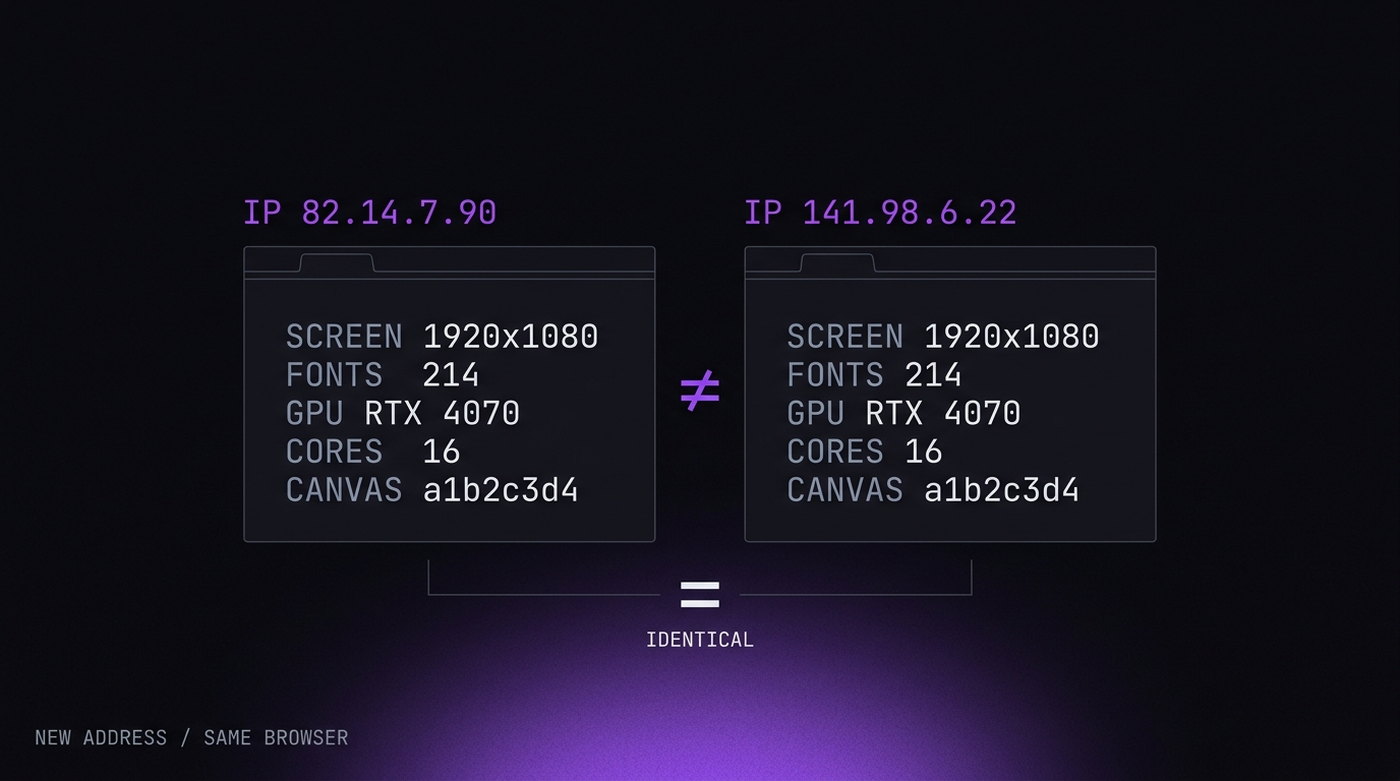
Open the same site through five different VPN servers and it still sees the same screen size, the same fonts, the same graphics card, the same language settings, the same everything. Those details together are usually enough to recognise the browser regardless of where the connection came from. Changing your address while keeping the same browser is a bit like changing your car and keeping your face.
Worth adding: commercial VPN addresses are widely known. Many services keep lists of them, and using one on an account that has always logged in from a home connection is itself a change worth noticing.
A separate profile changes what the browser says
This is the piece most people have never heard of, and it is the one that matters for keeping accounts apart.
Every browser broadcasts a description of itself to every site: operating system, screen resolution, installed fonts, graphics hardware, timezone, language, and a few dozen smaller details. Individually none of them identifies you. Together they usually do — and unlike cookies, you cannot clear them.
A dedicated profile gives each account its own version of all of that, plus its own cookies, its own storage, and its own network route. From the site's point of view, two accounts opened in two profiles are two accounts on two different computers, because everything they can measure says so.
The everyday version of the problem: you log into a second Instagram account from the same laptop, and within a week both are asking for a phone number. Nothing you did was wrong. The two accounts simply looked like the same device, which is exactly what the platform was checking for.
What none of them fixes
Being honest about the limits is more useful than another feature list.
How you behave. Ten accounts that log in within the same minute have identified themselves regardless of what tool sits underneath. Real people do not synchronise.
What you type. The same phone number, the same recovery email, the same payment card across accounts links them permanently. No browser has any say in this, and it is the most common way people get caught.
What you post. Same photos, same wording, same links, same posting times. Platforms compare content, not just devices.
The tool handles the technical link. The rest is habits.
Which one you actually want
Pick by the problem, not by which sounds strongest.
- Someone else uses this computer and I would rather they did not see my browsing. Incognito. That is precisely what it is for, and nothing else is needed.
- I am on café wifi and would rather my traffic were encrypted, or a service is not available in my country. A VPN.
- I need to keep several accounts on the same platform apart. Separate profiles. Neither of the other two will do it, and adding a VPN to incognito will not either.
- I just want less tracking in general. None of these three, really. A browser with tracking protection built in, plus an ad blocker, gets you further than any of them.
And the honest note to finish on: if you only have one account per service and no reason to keep them separate, you do not need a tool like ours. Incognito and a decent ad blocker cover most of what you want. We would rather say that than sell you something you will not use — there is a whole article on working out which side of that line you are on.